Products
PDFbatEdit, convert and sign PDFs
DocsBatWrite and edit documents
FormsBatForms, surveys and payments
BooksBatInvoices and accounting
Buildan.appAI website and app builder
SlidesBatAI presentations and memos
SheetsBatSpreadsheets with every formula
DriveOne drive for every app
OfficeBats
Pricing Blog Security About
Create your free accountSign in
PDFbatpdfbat.com

Every PDF job, done properly

Edit the words that are already on the page, convert, compress, merge and OCR, send documents for signature and ask AI about any PDF. All in the browser, with your OfficeBats account.

Try everything free for 3 days, no card needed.

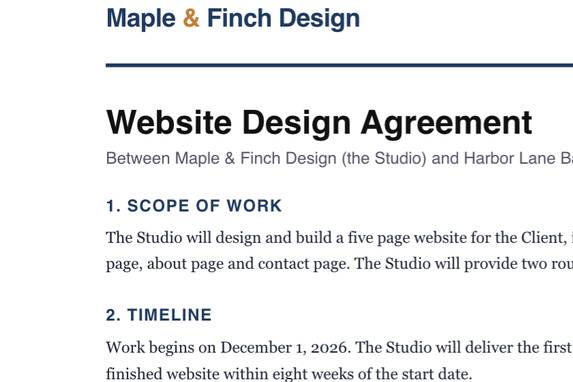
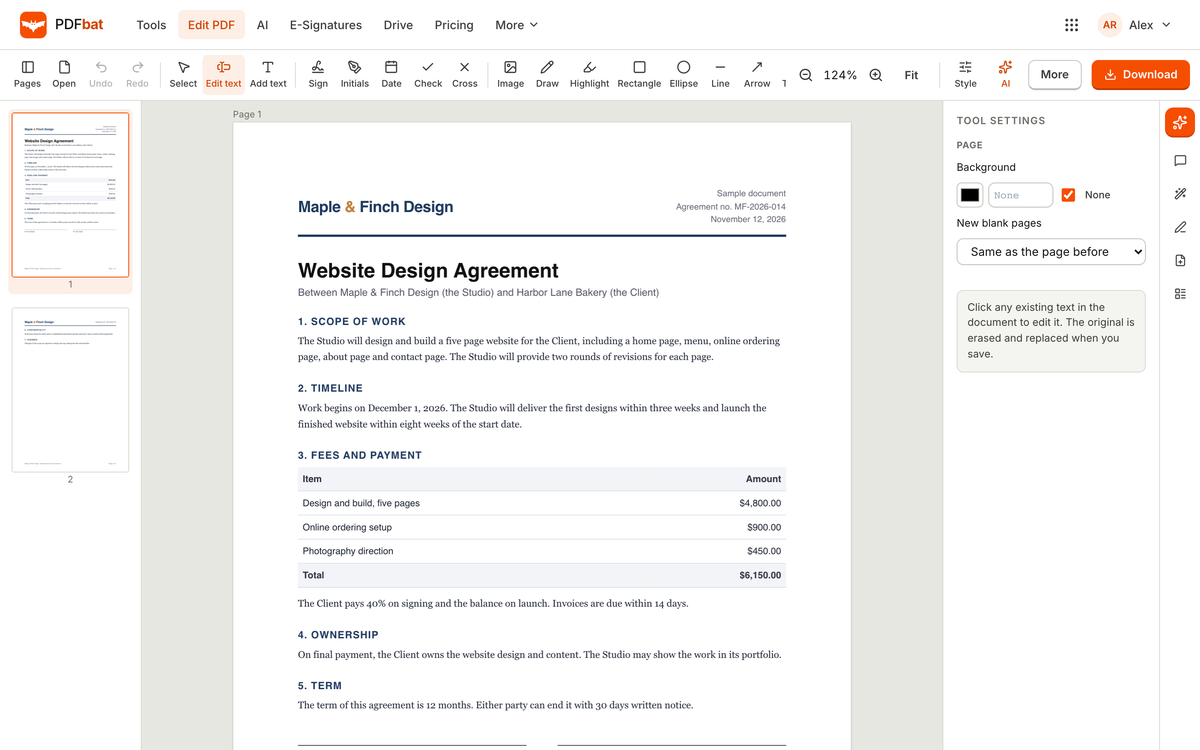
The PDFbat editor with a sample agreement open and the Edit text tool selected

A real screenshot of PDFbat with sample data

30+PDF tools
45OCR languages
76free templates
3 freesignature envelopes a month
Edit PDF online free

A PDF editor and toolkit that does the real work

Scroll through the real app. Every screen below is a screenshot of PDFbat with sample data.

01

Edit PDF text in place

Choose Edit text, click a line and type. PDFbat removes the old words from the page and writes yours in the same position and size, so the PDF still searches and copies correctly.

  • Text in any script, including right to left
  • Images, shapes, highlights, links and comments
  • True redaction and a pages panel
The PDFbat editor with a sample agreement open and the Edit text tool selected
02

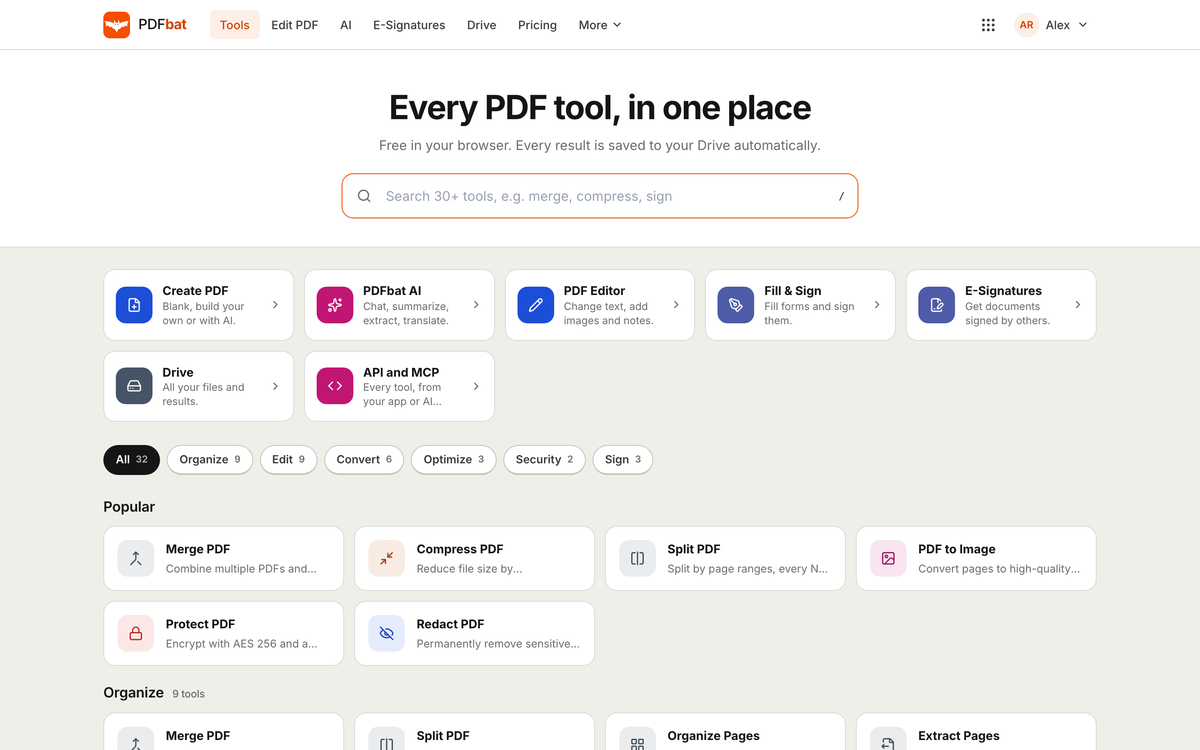
30+ PDF tools in one place

Merge, split, rotate, crop, watermark, protect, unlock, repair, add page numbers or Bates numbers, and convert to and from images, text and EPUB.

  • Every tool on the free plan
  • Results saved to your Drive
  • Works on phones and tablets
The PDFbat tools page listing every PDF tool by category
03

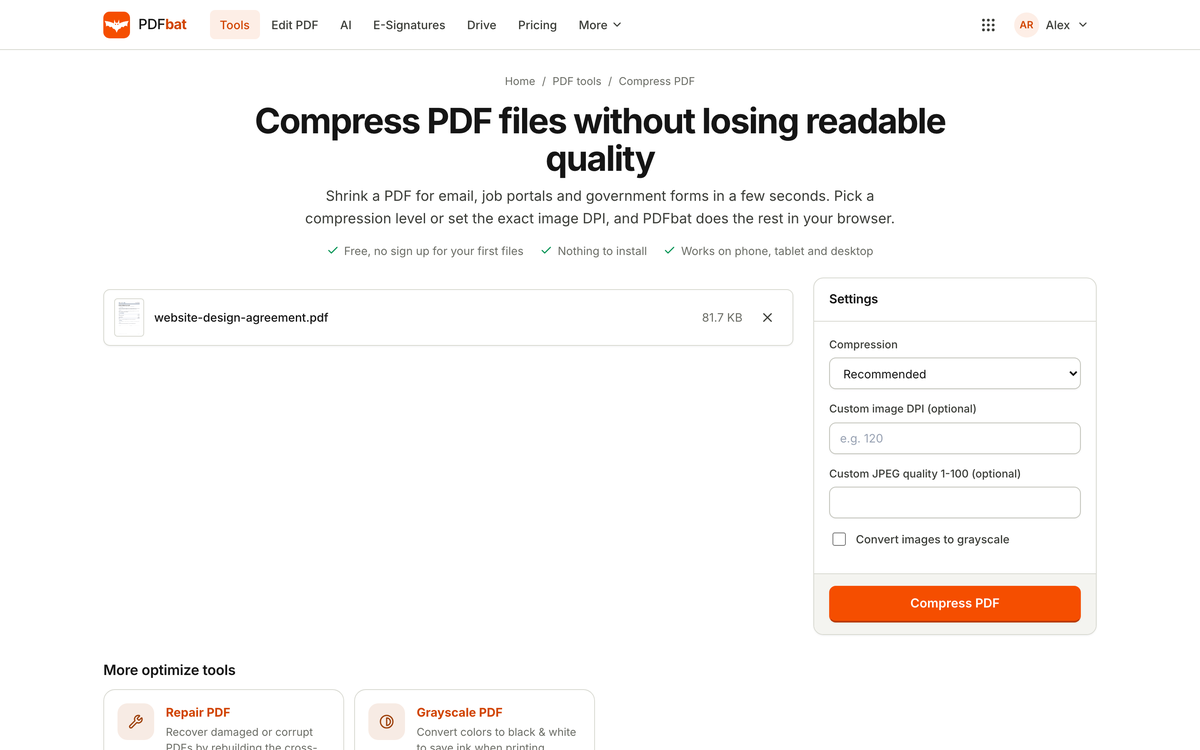
Compress a PDF without losing readable quality

Pick one of four levels or set the exact image DPI and JPEG quality yourself. PDFbat also removes duplicate objects and subsets fonts.

  • Low, Recommended, High and Extreme
  • Custom DPI and quality
  • Optional grayscale images
The PDFbat Compress PDF tool with a sample file and compression settings
04

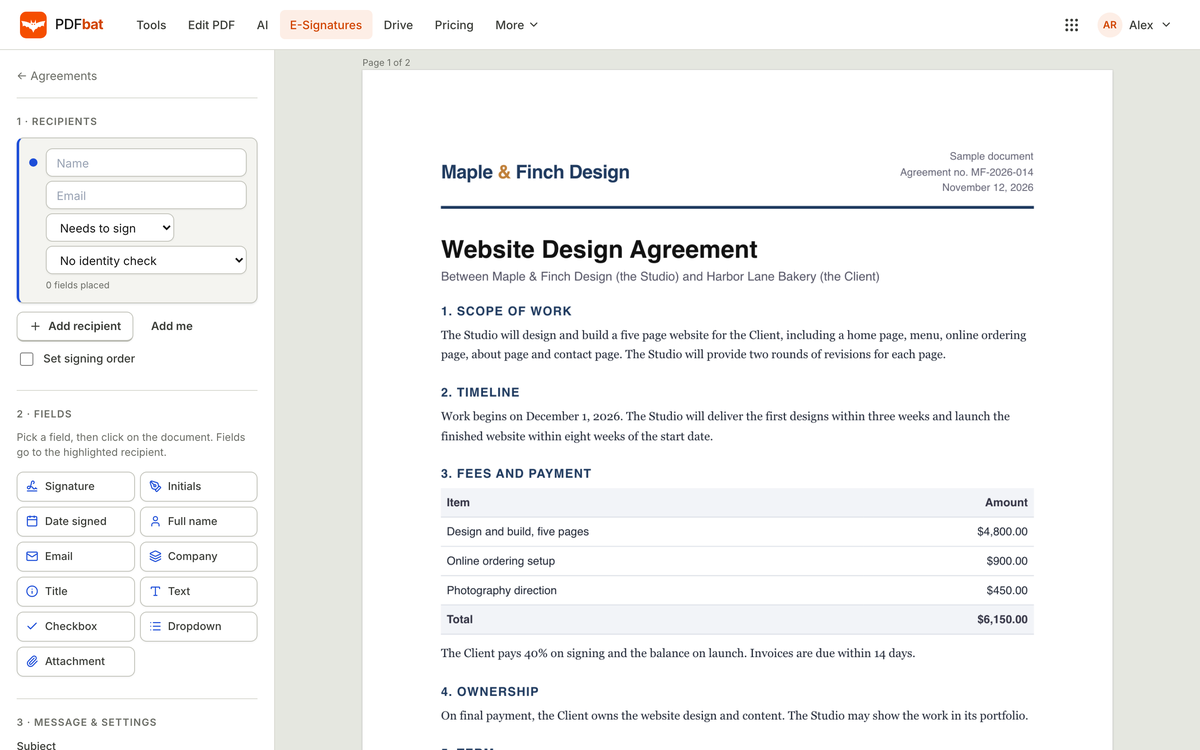
Send a PDF for e-signature

Add recipients, set the signing order and place fields. Signers need no account, and the finished PDF is sealed with a full audit trail.

  • Eleven field types
  • Access code or emailed code checks
  • Reminders, expiry and templates
Preparing a sample agreement for e-signature in PDFbat with recipients and fields
05

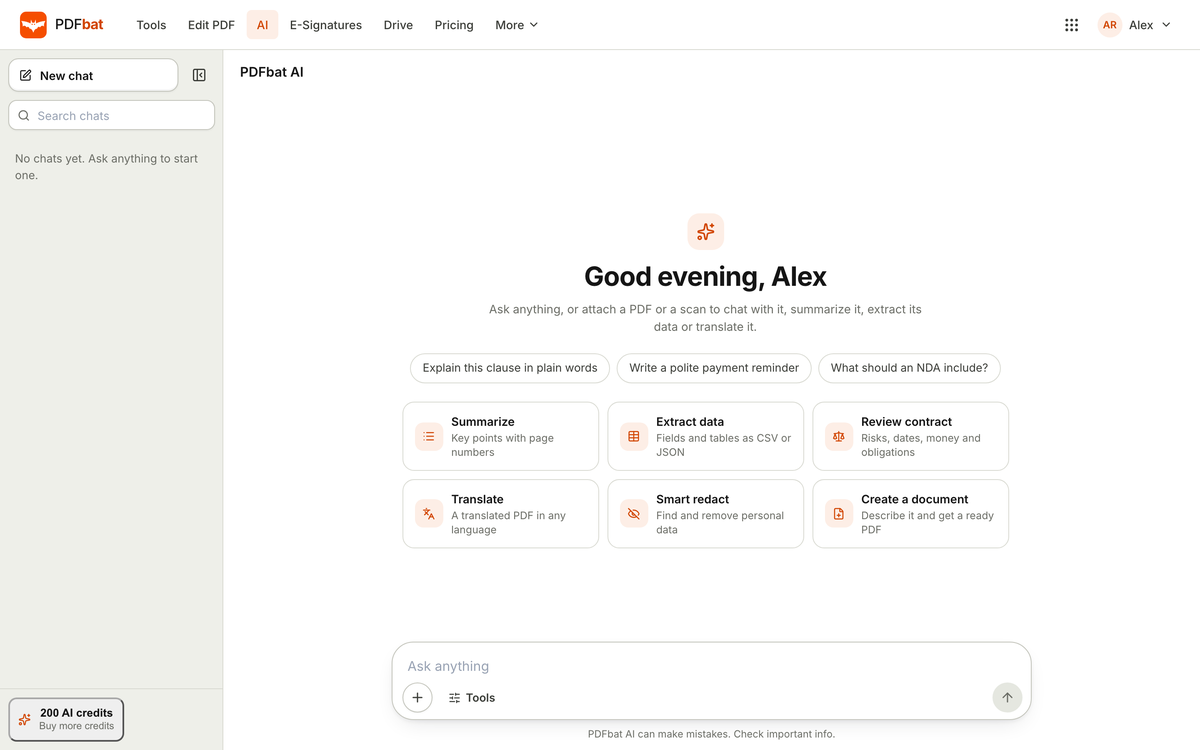
Chat with a PDF using AI

Ask questions with page citations, summarise long documents, translate a whole PDF, extract data to JSON or CSV and review contracts.

  • Answers cite the page
  • Works on scans too
  • Uses your shared AI credits
PDFbat AI chat with suggested actions such as summarise, extract data and review contract
06

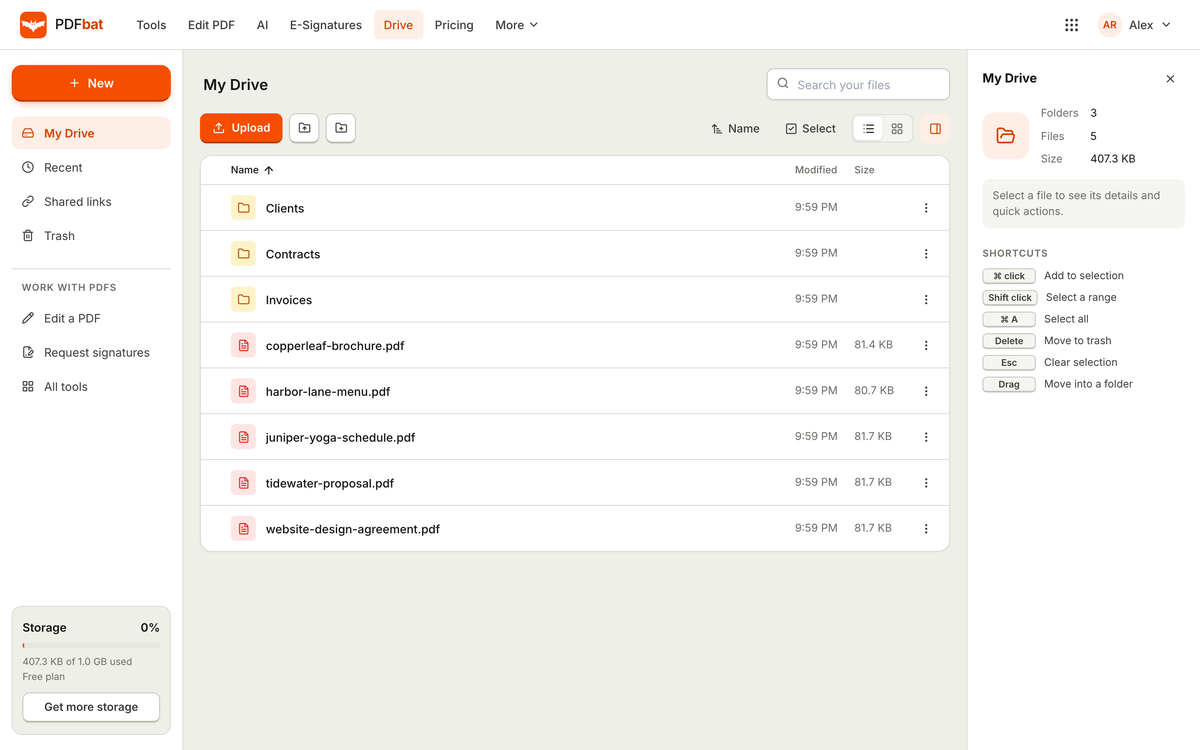
A PDF Drive for every result

Every edited, compressed or signed file is saved next to the original. Organise with folders and share links that expire.

  • Folders and search
  • Share links for 1, 7 or 30 days, or a year
  • Trash kept for 30 days
PDFbat Drive with folders and sample PDF files
Try it

See what each compression level does

PDFbat downsamples images to a target resolution and re-encodes them as JPEG. Drag the slider to see the real presets applied to a crop of a sample page.

Image resolution
150 DPI
JPEG quality
70
This sample image
30 KB

Sizes are for this sample image only. Savings on your file depend on how much of it is images.

Sample page crop compressed at the selected level
What PDFbat does

Edit, convert and sign PDFs, properly

Edit text in place

Click any line and type. The old words are removed from the page and your new text is written in their place, so it still searches and copies correctly.

30+ tools

Compress with four levels, merge, split, rotate, crop, watermark, Bates numbering, protect with AES-256, unlock, repair and more.

E-signatures

Signing order, reminders, access codes, templates, bulk send from CSV and a sealed PDF with a full audit trail. Signers need no account.

OCR for scans

Turn scanned pages into searchable, selectable text in 45 languages, with a second language for mixed documents.

PDFbat AI

Chat with a PDF with page citations, summarise, translate a whole file, extract data to JSON or CSV and review contracts.

One Drive

Every result is saved to your private OfficeBats Drive, the one every Bats app shares, with folders, expiring share links and a 30 day trash.

Everything inside

The full PDFbat feature list

Editor

  • Edit existing text, add text in any script, including Arabic, Hebrew, Hindi, Thai, Chinese, Japanese and Korean
  • Images, freehand drawing, highlights, shapes, links and sticky note comments
  • True redaction that deletes the text, images and vector art under the box
  • Fill and sign forms: text fields, checkboxes, dropdowns, initials, dates and flatten on save
  • Pages panel to reorder, rotate, duplicate, insert and delete pages

Convert and organise

  • PDF to JPG or PNG up to 600 DPI, PDF to text, HTML or JSON
  • JPG, EPUB, XPS and CBZ to PDF, and text, Markdown, CSV or code to PDF
  • Merge with one bookmark per file, split, extract pages and N-up layouts
  • Compress with four levels, custom DPI and grayscale
  • Header and footer, page numbers, watermark, metadata and Bates numbering

Sign and share

  • Eleven field types, sequential or parallel routing and CC recipients
  • Access code or emailed code checks before a document opens
  • Templates with roles, bulk send up to 500 rows and public signing links
  • Certificate of completion, SHA-256 hashes and a PKCS#7 digital seal
  • Share links that expire after 1 day, 7 days, 30 days or 1 year

For developers

  • REST API with an OpenAPI spec: tools, edit, forms, AI, Drive and envelopes
  • Webhooks for envelope sent, completed, declined, voided and expired
  • An MCP server so AI assistants can run PDFbat tools for you
  • 250 free API calls a month, then pay as you go
How it works

Three steps in PDFbat

  1. 1

    Open a PDF

    Upload from your device or pick a file from your PDF Drive. Nothing to install, on desktop or phone.

  2. 2

    Edit, convert or sign

    Choose a tool or open the editor. Results land in your Drive next to the original.

  3. 3

    Share or send

    Download, share a link that expires, or send for signature and get a sealed PDF back.

Plans

PDFbat on Free, Pro and Business

One OfficeBats plan covers PDFbat and the six other apps. Pick Free, Pro or Business once.

PDFbat on Free, Pro and Business
PDFbatFreeProBusiness
Price, covers all seven apps$0$10.99 a month$19 a month
PDF tool tasks10 a dayUnlimitedUnlimited
Largest file25 MB100 MB100 MB
Signature envelopes3 a monthUnlimitedUnlimited
OCR, editor and every toolIncludedIncludedIncluded
OCR in 45 languagesIncludedIncludedIncluded
Templates, bulk send and public signing linksIncludedIncludedIncluded
REST API and MCP server250 calls a month, then pay as you go250 calls a month, then pay as you go250 calls a month, then pay as you go
Shared AI credits each month3005,00020,000

Edit PDF online, free, and edit the real text

Most online PDF editors place a new text box over the page and leave the old words underneath. PDFbat removes the original glyphs from the page content and writes your new text in the same position and size, so the file still reads, searches and copies like the original. It works in every writing system, including right to left scripts.

Around the editor sit more than thirty PDF tools: compress a PDF without losing quality, merge and split files, rotate and crop pages, add page numbers and watermarks, protect a PDF with a password or unlock one you own. Scanned documents become searchable with OCR in 45 languages.

E-signatures with a sealed audit trail

Send a PDF for signature with signing order, reminders, expiry dates and identity checks. When everyone has signed, PDFbat seals the document with a digital signature and appends a certificate of completion with every event, so any later change can be detected.

Part of your OfficeBats account

Sign in to PDFbat with your OfficeBats account. One plan covers PDFbat and every other Bats app, and AI features draw from one shared credit wallet.
PDFbat questions

Is PDFbat free?

Yes. The free plan includes every PDF tool, 10 tool tasks a day, files up to 25 MB, 3 signature envelopes a month, your 5 GB Drive shared with every Bats app and your share of the AI wallet. There is no watermark on your files.

What does Pro unlock in PDFbat?

Unlimited tool tasks and envelopes, files up to 100 MB and a 100 GB Drive shared by every Bats app. The same Pro plan also unlocks every other Bats app.

Can I edit a scanned PDF?

A scan is a picture of text. Run OCR first to add a real text layer, then edit, search and copy it like any other PDF.

Are PDFbat e-signatures legally binding?

Electronic signatures are recognised for most business documents under laws such as ESIGN in the United States and eIDAS in the European Union. PDFbat records an audit trail and seals the final PDF. Some documents, like certain wills, have special rules.

Do signers need an account?

No. Signers open a private link from their email and sign in the browser. Only the sender needs an account.

Open PDFbat with your OfficeBats account

Create a free account once and use it for PDFbat and every other Bats app.