Forms that finish the paperwork: turn every response into a signed document
Turn each form response into a finished, signed document automatically. Templates, Word placeholders, e-signature, approvals and storage, step by step.
A lot of office work follows the same pattern. Someone fills in a form. Someone else copies those answers into a Word template. The document is saved as a PDF, emailed out for a signature, chased, signed, and finally filed in a folder that nobody can find six months later.
Every step in that chain is a place for typos, delays and lost files. The fix is to let the form do the paperwork: each response fills a document, the document goes out for signature, and the signed copy is filed automatically.
This guide explains how that works in FormsBat, with examples, setup steps and a few honest tips about where it fits.
What "forms that create documents" means
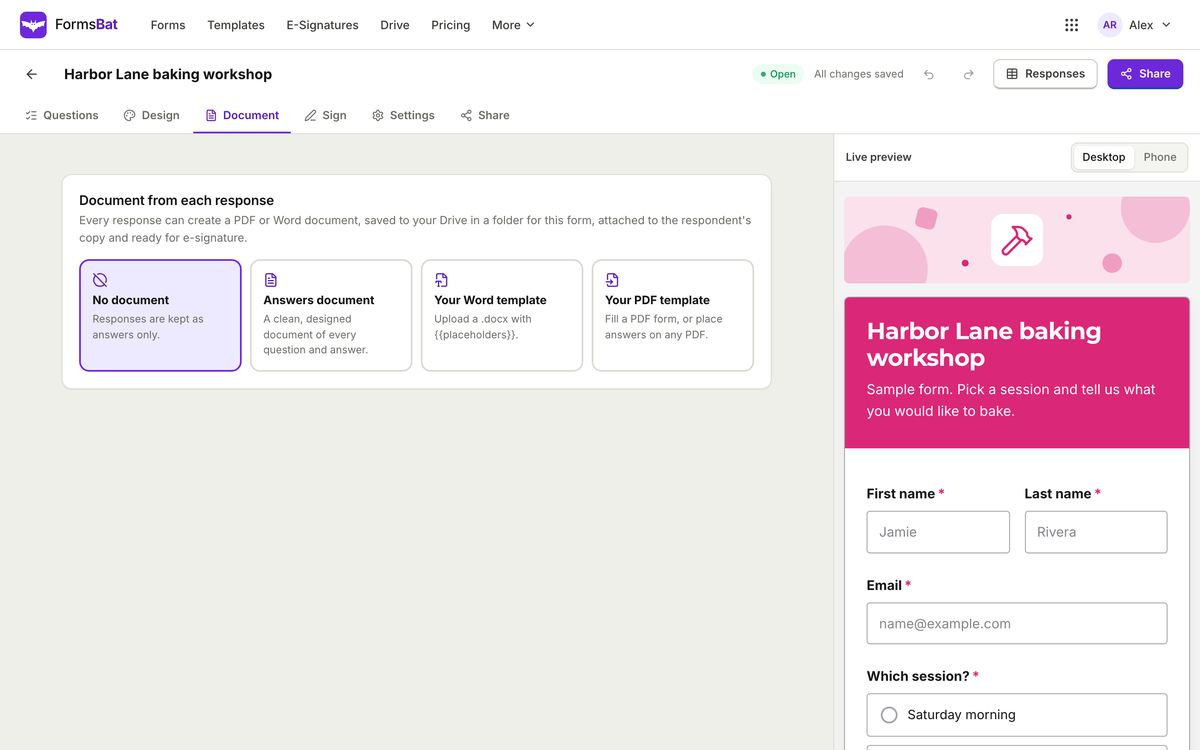
In FormsBat, each response to a form can generate a document. You choose what that document looks like:
- One of 5 designed layouts. Pick a layout and the answers are arranged into a clean document. This is the fastest way to start.
- Your own Word template. Write the document in Word, with
{{placeholders}}where answers should appear and if blocks for sections that only apply in some cases. - Your own PDF. Use an existing PDF, such as an official form your organisation already relies on, and have answers placed into it.
Your own Word and PDF templates are available on Pro and Business.
The document can then go to e-signature: the respondent, you as the owner, and any extra signers can sign. The result is a sealed PDF with an audit trail. Every document is saved to Drive in a folder for that form, so finished paperwork always lives in one predictable place.
Where this saves real time
Some typical uses:
| Situation | Form collects | Document produced |
|---|---|---|
| A landscaper quoting a job | Client details, scope, price | Service agreement signed by client and owner |
| A dog walker onboarding a new client | Pet details, vet contact, schedule | Care agreement and liability waiver |
| A small agency starting a project | Contacts, deliverables, deadlines | Statement of work ready to sign |
| An HR team hiring | Start date, role, salary details | Offer letter signed by the candidate |
| A venue taking bookings | Event date, guest count, extras | Booking contract with deposit terms |
In each case the person filling the form is the person who needs to sign, so the whole thing can happen in one sitting.
How to set it up
- Build the form. Sign in at formsbat.com and start from one of the 119 templates, or describe what you need and let AI draft it. Add the questions your document needs.
- Use the right question types. Name, email, phone, address and date questions give clean, consistent values to drop into a document. FormsBat also has signature, initials and date signed questions if you want the signature captured inside the form itself.
- Choose the document. Pick a designed layout, or upload your Word template or PDF.
- Match answers to the document. Make sure each placeholder or field lines up with the question that should fill it.
- Turn on e-signature if the document needs to be signed, and add the signers: the respondent, yourself, and anyone else who must sign.
- Set up notifications. Turn on the owner notification email, and send the respondent a copy with the document attached.
- Test with a real looking response. Fill the form yourself and read the document that comes out.
Writing a good Word template
If you use your own Word template, a little care makes the results look hand written rather than mail merged.
Write full sentences around placeholders
"This agreement is between {{client_name}} and Bright Lawns" reads naturally. A table of labels and blanks works too, but full sentences feel more like a real document.
Use if blocks for optional sections
Not every client needs every clause. If blocks let you include a section only when a particular answer is given, for example a deposit clause only when the client chose "Pay deposit now". One template can then cover several variations, instead of maintaining five near identical files.
Keep formatting in the template
Set fonts, headings, your logo and page numbers in the Word file itself. If you need to edit the template later, you can open it in DocsBat in the browser. For tips on keeping layout intact when Word becomes PDF, see Word to PDF without breaking your formatting.
Avoid placeholders for things that never change
Your own company name and address belong as plain text in the template. Only answers that vary per response need a placeholder.
Signing, sealing and approvals
Once a document needs a signature, the process follows the same approach as e-signatures in PDFbat: signers do not need an account, and the finished PDF is sealed with an audit trail, so you can show who signed and when, and later changes to the file are detectable. For the full picture of how e-signature envelopes work, read how to send documents for e-signature.
Approvals before anything goes out
Some documents should not be sent until someone checks them. FormsBat supports approval workflows: approvers review a response in sequence and approve or reject it with a comment. A manager can sign off on a discount, or a finance lead can check a purchase request, before the paperwork moves on.
A note on legal validity
Electronic signatures are recognised for most business documents under laws such as ESIGN in the US and eIDAS in the EU. Some documents, including certain wills and some court, family and real estate documents, have special rules. If you are unsure about a particular document, check local requirements.
Where the documents go
Every generated document is saved to Drive in a folder per form. That means:
- All signed agreements for a form sit together in one place.
- You can open any document in PDFbat tools, for example to merge a month of agreements into one file or add a watermark.
- Share links can expire after 1 day, 7 days, 30 days or 1 year.
Connecting other systems
If you want documents to flow into other software, FormsBat has a REST API covering forms, responses and documents, and signed webhooks for events such as "response created" and "document ready". A developer can use the "document ready" event to copy each finished file into another system as soon as it exists.
Honest tradeoffs
Automating documents is not right for every case.
- Highly negotiated contracts that change substantially for each client are better drafted by hand. Automation works best when most of the document is standard.
- Templates need maintenance. When your terms change, update the template, then run a test response. Old documents stay as they were signed.
- Start simple. A designed layout is a good first version. Move to your own Word template once you know which wording you want.
Where to start
- Pick one paperwork task you repeat every week.
- Build the form in FormsBat, choose a designed layout, and turn on e-signature.
- Test it with awkward answers, then send the link to your next client.
Once it works, upgrade that document to your own Word template on Pro, and let every response finish its own paperwork.