Products
PDFbatEdit, convert and sign PDFs
DocsBatWrite and edit documents
FormsBatForms, surveys and payments
BooksBatInvoices and accounting
Buildan.appAI website and app builder
SlidesBatAI presentations and memos
SheetsBatSpreadsheets with every formula
DriveOne drive for every app
OfficeBats
Pricing Blog Security About
Create your free accountSign in
FormsBatformsbat.com

Forms that finish the paperwork

Build forms and surveys, take payments, publish on your own domain and see every answer. Each response can become a finished PDF or Word document, ready for signature.

Try everything free for 3 days, no card needed.

The FormsBat form builder with a sample workshop sign up form and live preview

A real screenshot of FormsBat with sample data

28question types
119templates
8themes with dark mode
1,000responses a month free
Online form builder with payments

Build a form, get a finished document

Scroll through the real app. Every screen below is a screenshot of FormsBat with sample data.

01

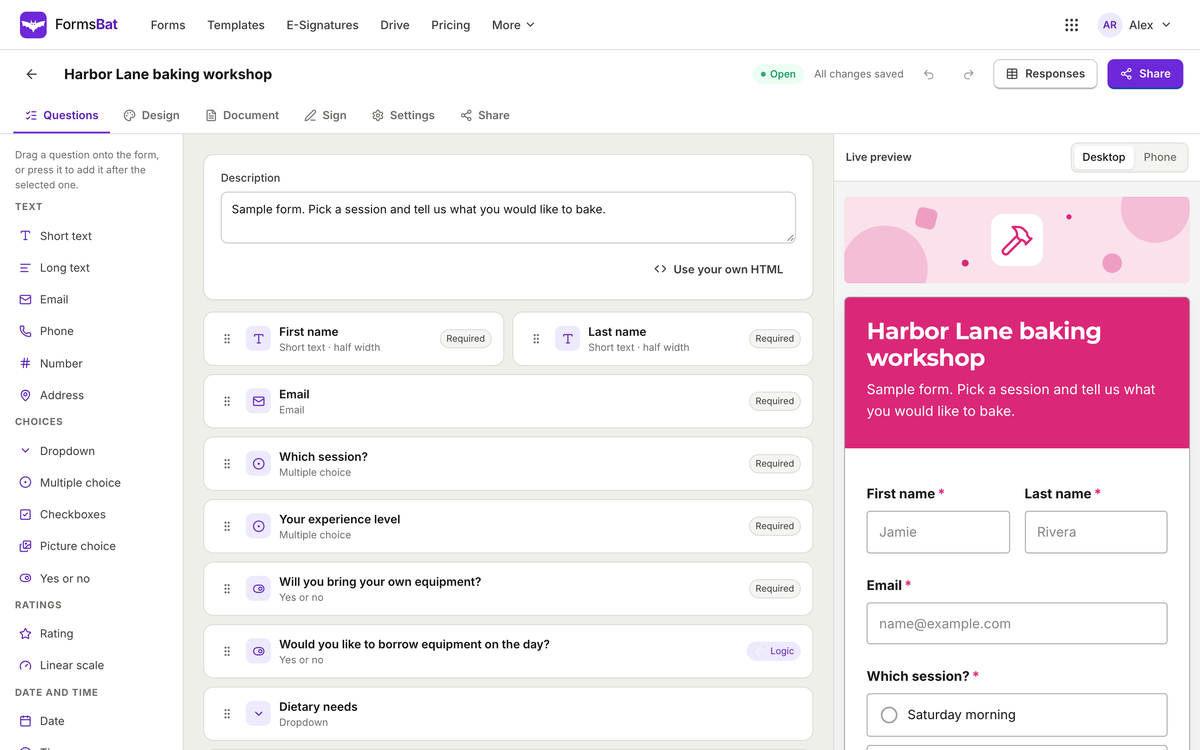
A drag and drop form builder

Drag questions onto the form and watch the live preview update on desktop and phone. Add logic to show or hide questions based on earlier answers.

  • 28 question types
  • Conditional logic and validation
  • Multi page forms with progress
The FormsBat form builder with a sample workshop sign up form and live preview
02

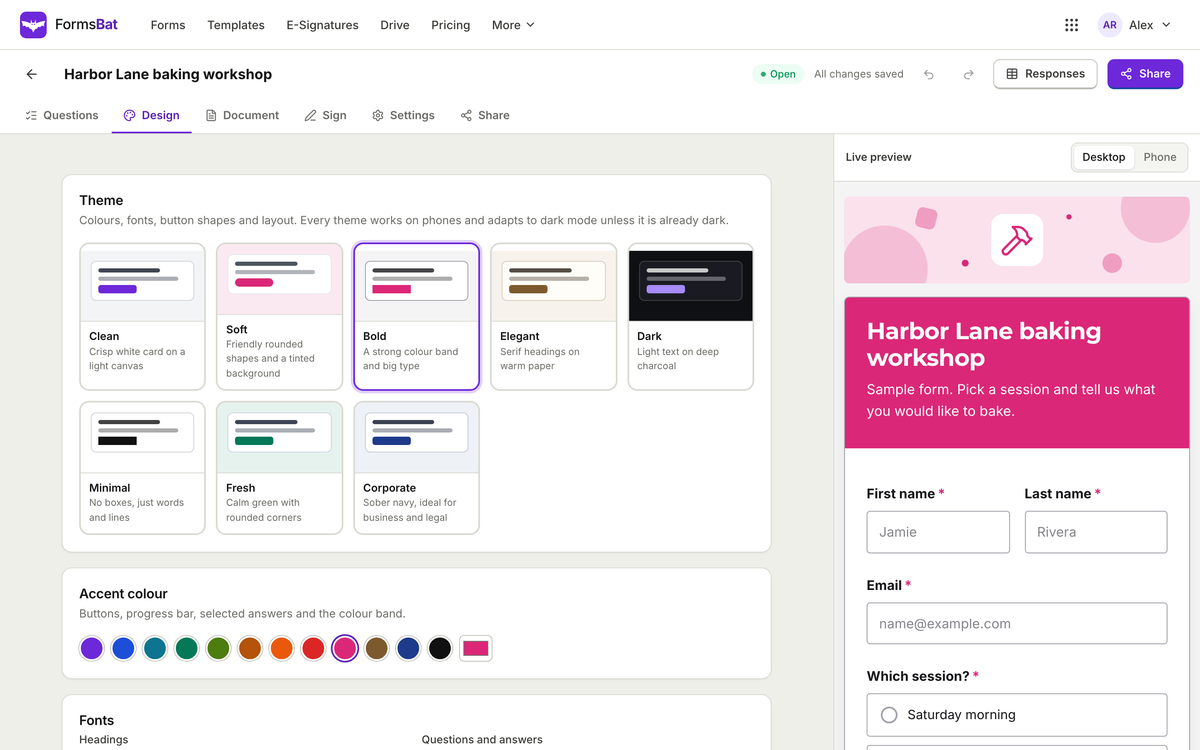
Themes that match your brand

Pick one of eight themes, then set the accent colour, fonts, logo and cover image. Every theme works in dark mode.

  • Clean, Soft, Bold, Elegant and more
  • Accent colour and fonts
  • Phone and desktop preview
FormsBat theme settings with eight themes, accent colours and a live preview
03

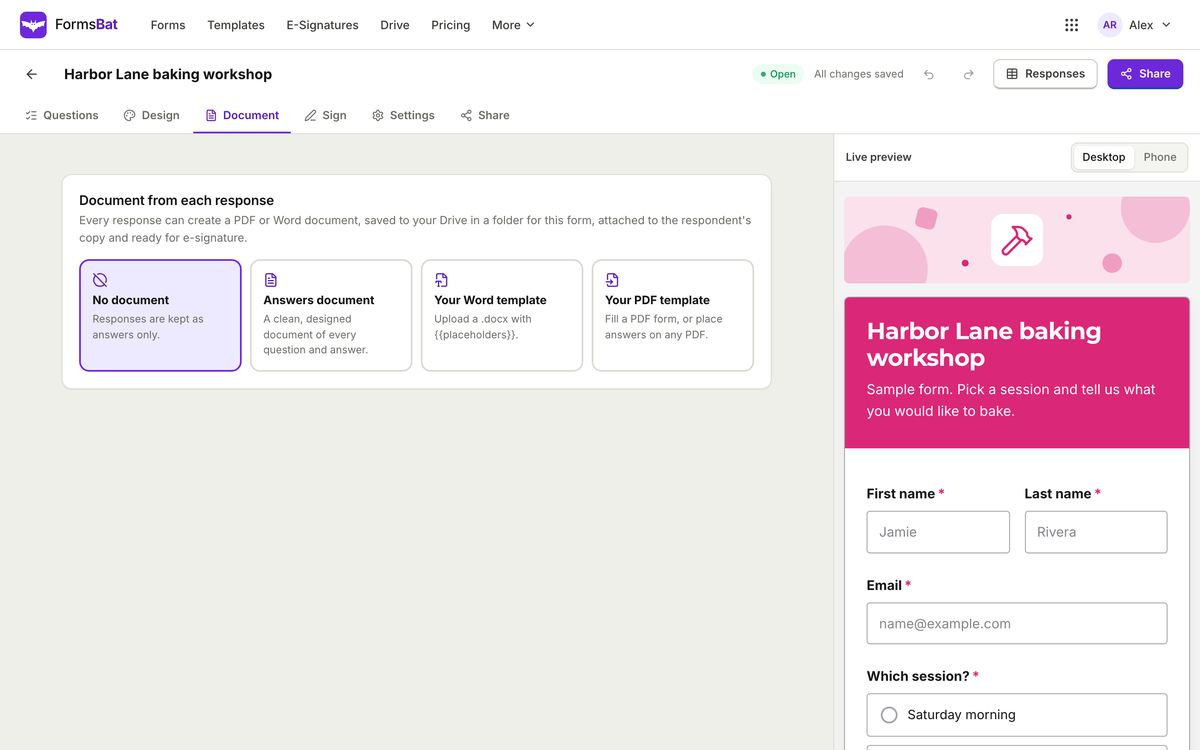
A PDF or Word document from every response

Choose a designed layout, upload your own Word template with placeholders, or fill your own PDF. Each response becomes a document in your Drive.

  • 5 designed answer layouts
  • Your Word or PDF template on Pro
  • Send it for e-signature
FormsBat document settings that turn each response into a PDF or Word document
04

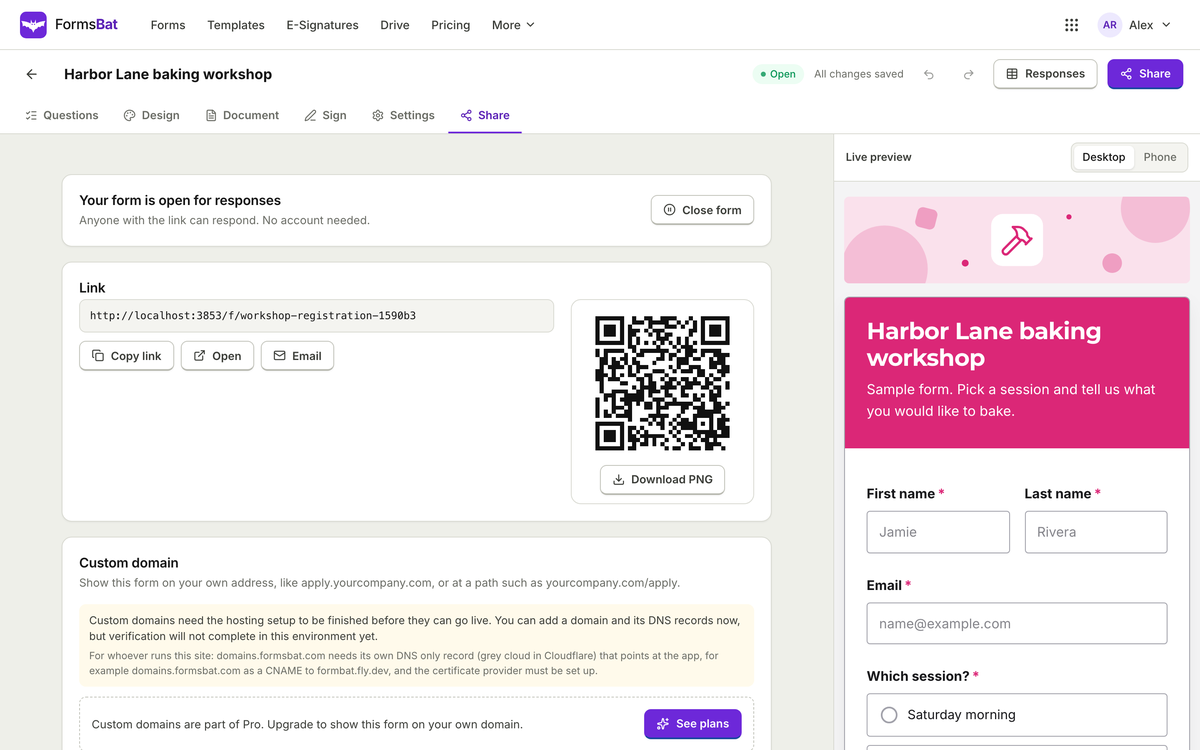
Share by link, embed or QR code

Copy the link, embed the form on any website or download a QR code. On Pro, publish on your own domain.

  • Self resizing embed
  • QR code as SVG or PNG
  • Custom domains on Pro and Business
FormsBat share settings with a link, QR code and custom domain option
05

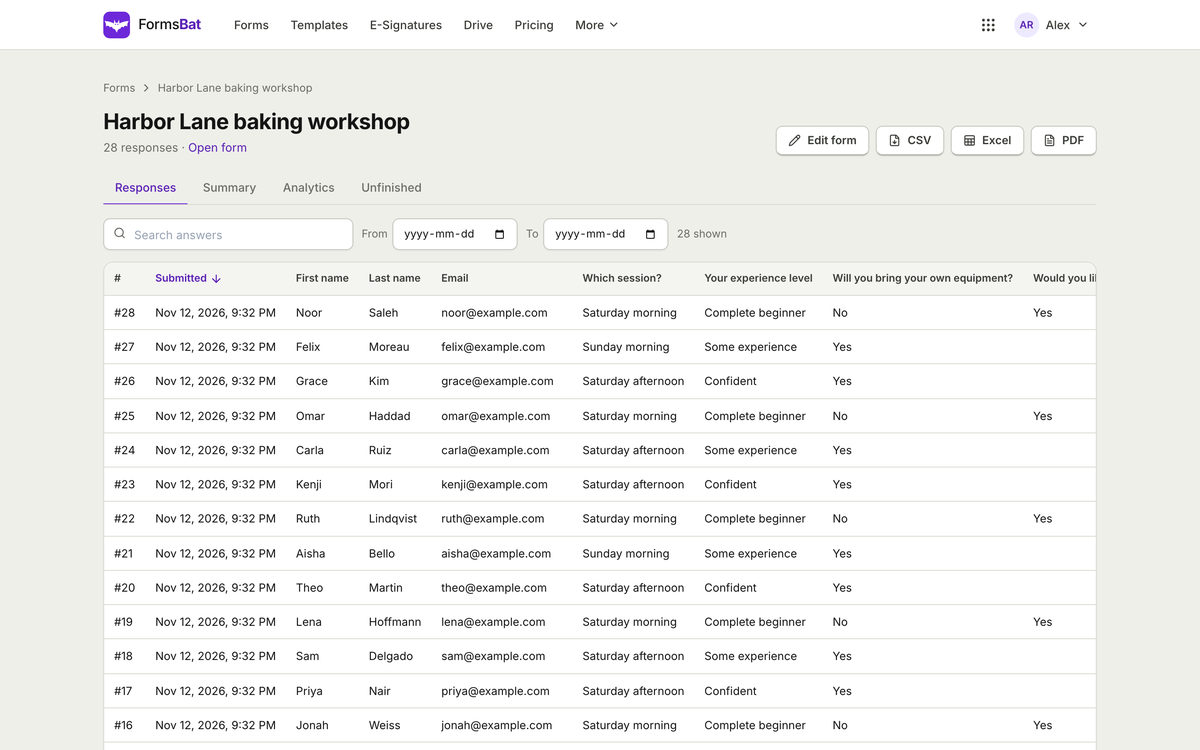
Every response, searchable

Filter by date, search answers and export to CSV, Excel or PDF. A live CSV feed keeps a spreadsheet up to date.

  • CSV, Excel and PDF export
  • Search and date filters
  • Live CSV feed
FormsBat responses table for a sample form with export buttons
06

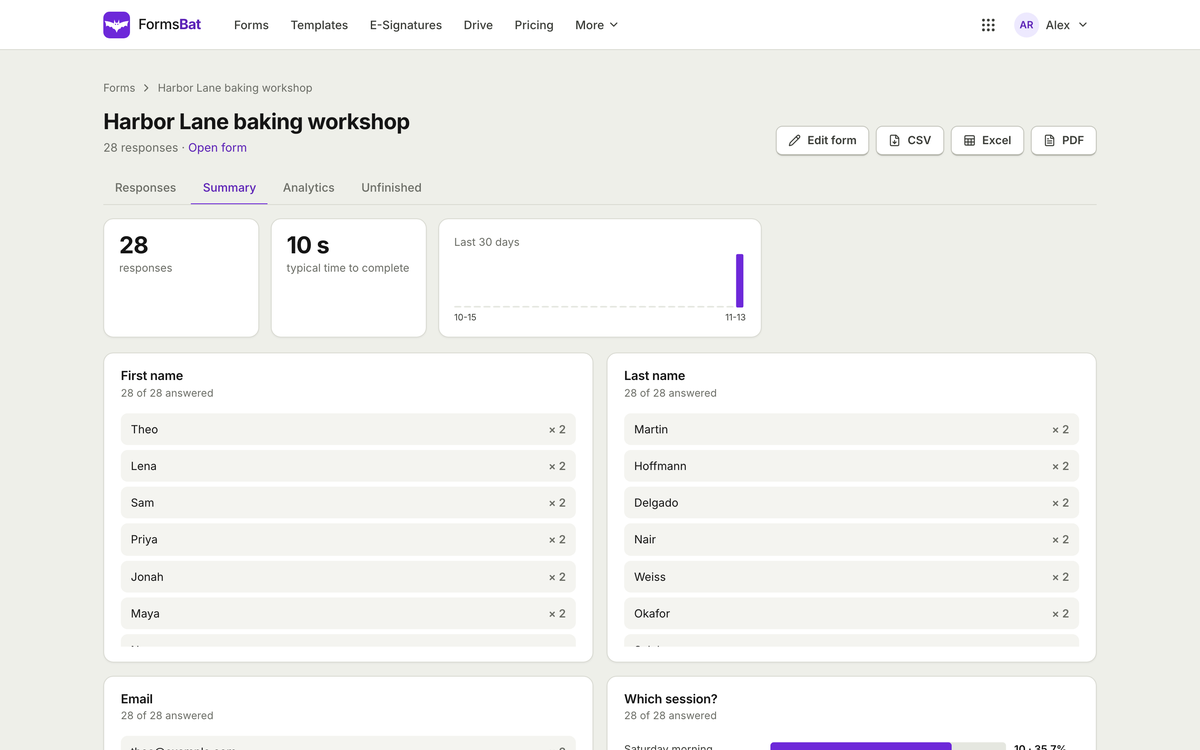
A summary of every question

See totals, typical completion time and the answers to each question at a glance.

  • Totals per question
  • Response trend
  • NPS for score questions
FormsBat response summary with totals and answers per question
07

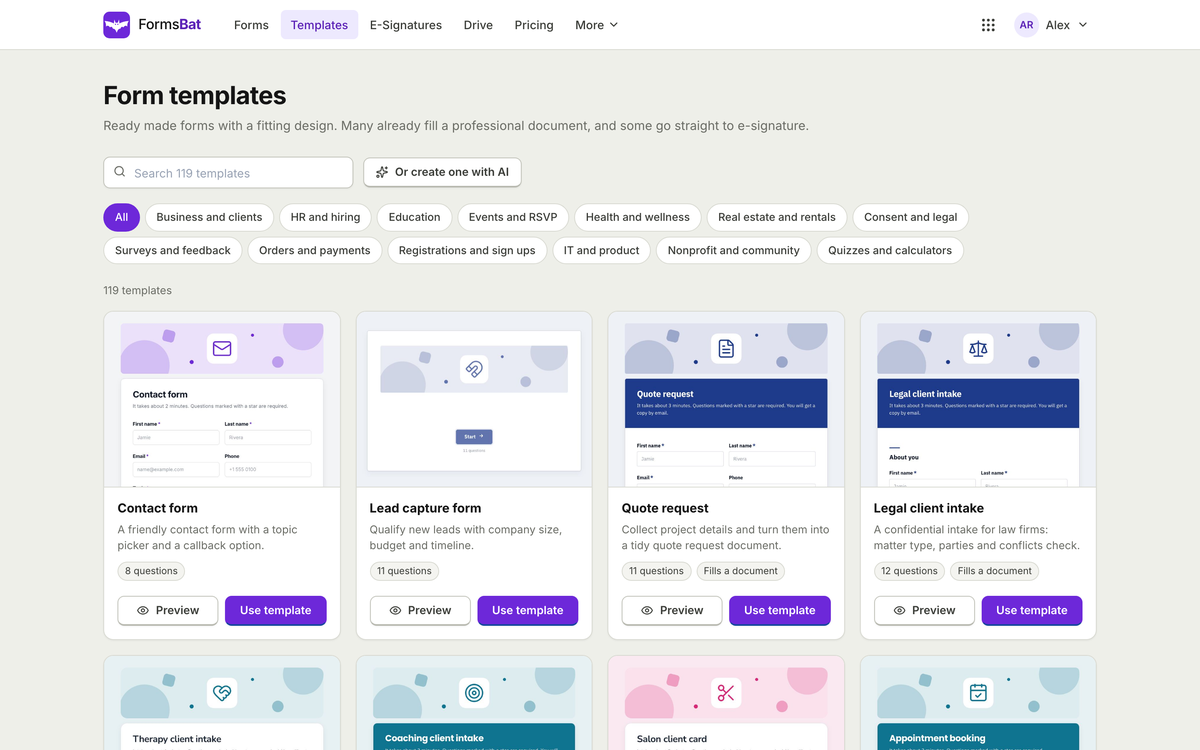
119 form templates

Start from a contact form, booking request, job application, order form, survey or quiz, ready to customise.

  • 13 categories
  • Preview before you start
  • Or describe a form to AI
The FormsBat form template gallery
Try it

Build a tiny form right here

Click question types to add them to the preview. In FormsBat you drag them onto the form, add logic and publish.

Add a question

FormsBat has 28 question types, logic, themes and payments through your own Stripe account.

Workshop sign upSample form
Submit
What FormsBat does

Forms, surveys and payments, properly

28 question types

Text, choice, rating, linear scale, file upload, signature, address, calculation, payment, hidden fields, page breaks and more.

Logic and validation

Show or hide questions and pages based on earlier answers, with length, range and pattern checks.

Payments in forms

Take payments through Stripe Connect on your own Stripe account. No platform fee by default.

Documents from answers

Every response can fill a designed layout, your own Word template with placeholders, or your own PDF.

Responses and analytics

A searchable table, CSV and Excel export, charts per question, NPS score and responses per day.

Your own domain

Share by link, embed or QR code, or publish forms on your own domain with Pro.

Everything inside

The full FormsBat feature list

Build

  • Create a form from a description with AI, or start from 119 templates in 13 categories
  • Multi page forms with a progress bar, save and resume links
  • Eight themes with accent colour, fonts, logo, cover image and dark mode
  • Multi language forms, translated with AI

Collect

  • Close date, response limits, one response per person or email
  • Spam protection: honeypot, minimum fill time and rate limits
  • Approval workflows with approvers in sequence
  • Respondent copies with the document attached

Understand

  • Searchable response table, CSV and Excel export
  • Charts per question, NPS score and responses per day
  • A live CSV feed you can pull into a spreadsheet
  • Shared workspaces with viewer, editor and admin roles

Connect

  • REST API for forms, responses and documents
  • Signed webhooks when a response arrives or a document is ready
  • An MCP server to list forms and read responses
How it works

Three steps in FormsBat

  1. 1

    Build

    Describe the form to AI or pick a template, then add questions, logic and a theme.

  2. 2

    Share

    Send a link, embed it on your site, print a QR code or publish on your own domain.

  3. 3

    Act on answers

    Read charts, export to Excel, and let each response create a document or a signature request.

Plans

FormsBat on Free, Pro and Business

One OfficeBats plan covers FormsBat and the six other apps. Pick Free, Pro or Business once.

FormsBat on Free, Pro and Business
FormsBatFreeProBusiness
Price, covers all seven apps$0$10.99 a month$19 a month
FormsUnlimitedUnlimitedUnlimited
Responses1,000 a month10,000 a month100,000 a month
Custom domainsNot included15
Workspace members21050
Your own Word and PDF templatesNot includedIncludedIncluded
Remove FormsBat brandingNot includedIncludedIncluded
Payments in forms with your own Stripe accountIncludedIncludedIncluded
E-signature envelopes3 a monthUnlimitedUnlimited
Largest upload25 MB100 MB100 MB
Shared AI credits each month3005,00020,000

An online form builder with payments and documents

FormsBat is an online form and survey builder with 28 question types, conditional logic, multi page layouts and eight themes. Share a form by link, embed it in a page, print a QR code or publish it on your own domain.

What sets it apart is what happens after someone presses submit. Each response can fill a designed document, your own Word template or your own PDF, be saved to a folder for that form, and go straight to e-signature. Rental applications, consent forms, order forms and onboarding packs finish themselves.

Payment forms with your own Stripe account

Add a payment question to sell tickets, take deposits or collect fees. Money goes to your own Stripe account through Stripe Connect, with no platform fee added by default.

FormsBat questions

How many forms can I create?

As many as you like on every plan. Free includes 1,000 responses a month, Pro 10,000 and Business 100,000.

How do payments in forms work?

You connect your own Stripe account through Stripe Connect. Payments go to your account and FormsBat adds no platform fee by default.

Can I use my own domain?

Yes. Pro includes one custom domain and Business includes five.

Do people need an account to fill in a form?

No. Anyone with the link can respond, unless you turn on sign in for that form.

Can I remove the FormsBat branding?

Yes. Pro and Business remove the "Made with FormsBat" line from your forms.

Open FormsBat with your OfficeBats account

Create a free account once and use it for FormsBat and every other Bats app.