Products
PDFbatEdit, convert and sign PDFs
DocsBatWrite and edit documents
FormsBatForms, surveys and payments
BooksBatInvoices and accounting
Buildan.appAI website and app builder
SlidesBatAI presentations and memos
SheetsBatSpreadsheets with every formula
DriveOne drive for every app
OfficeBats
Pricing Blog Security About
Create your free accountSign in
SheetsBatsheetsbat.com

The spreadsheet that knows every formula

Start in a blank sheet or a ready made template. 536 functions, pivot tables, charts and live collaboration, your Excel files open just as they are, and AI writes and explains formulas right in the sheet.

Try everything free for 3 days, no card needed.

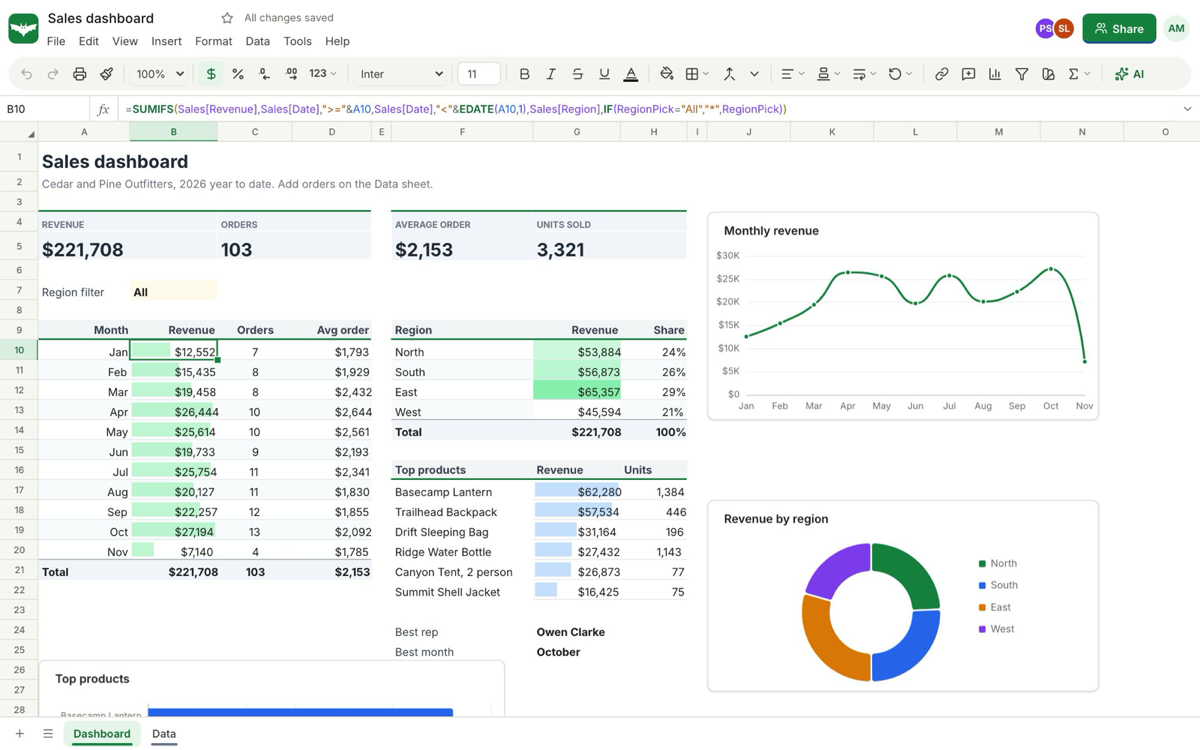
A sample sales dashboard in SheetsBat with formulas, conditional formatting and charts

A real screenshot of SheetsBat with sample data

536functions
14chart types
73free templates
25 freeworkbooks on the free plan
Online spreadsheets

Every formula you know, in your browser

Scroll through the real app. Every screen below is a screenshot of SheetsBat with sample data.

01

A spreadsheet that does the real work

Formulas, charts and formatting that update as the numbers change, in a sheet that opens in any browser. No install, and no account needed to try it.

  • Charts that follow your data
  • Conditional formatting and validation
  • Works on phones
A sample sales dashboard in SheetsBat with formulas, conditional formatting and charts
02

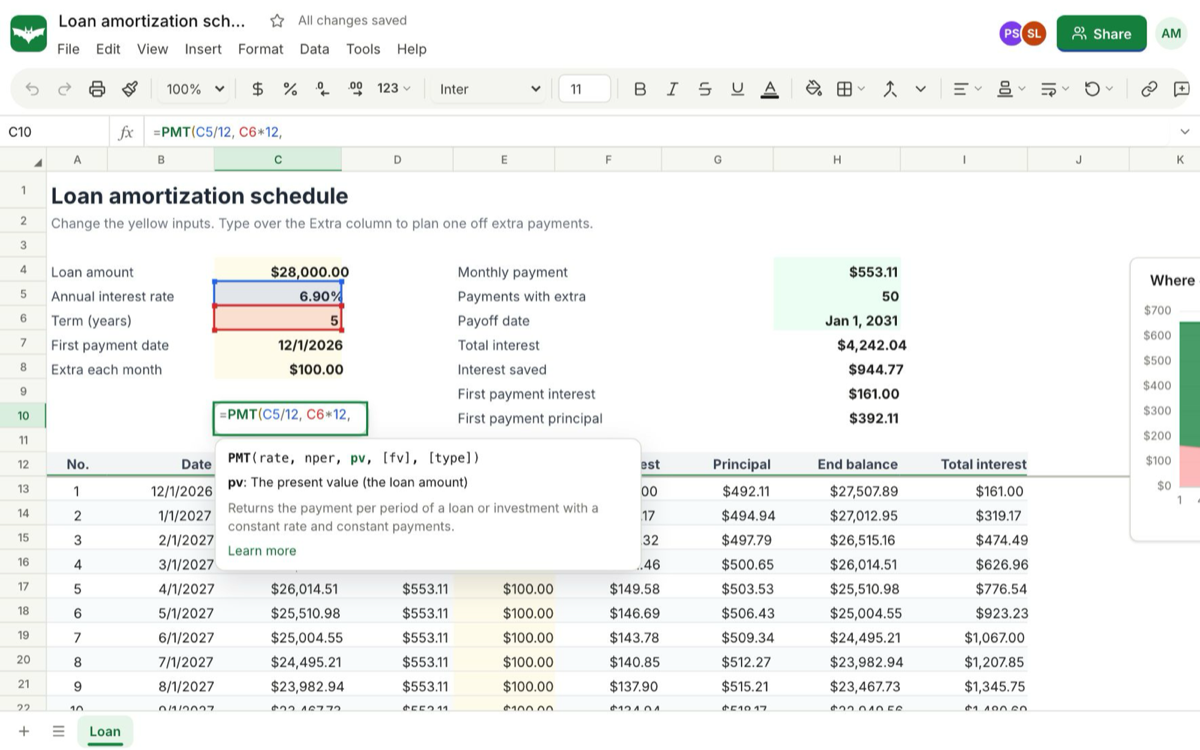
536 functions with dynamic arrays

XLOOKUP, FILTER, SUMIFS, LET, LAMBDA, GROUPBY and PIVOTBY work the way spreadsheet people expect, and results spill into the cells next to them.

  • Autocomplete shows every argument
  • Tables and named ranges
  • A reference page for every function
A SheetsBat loan schedule with the PMT function hint shown while a formula is typed
03

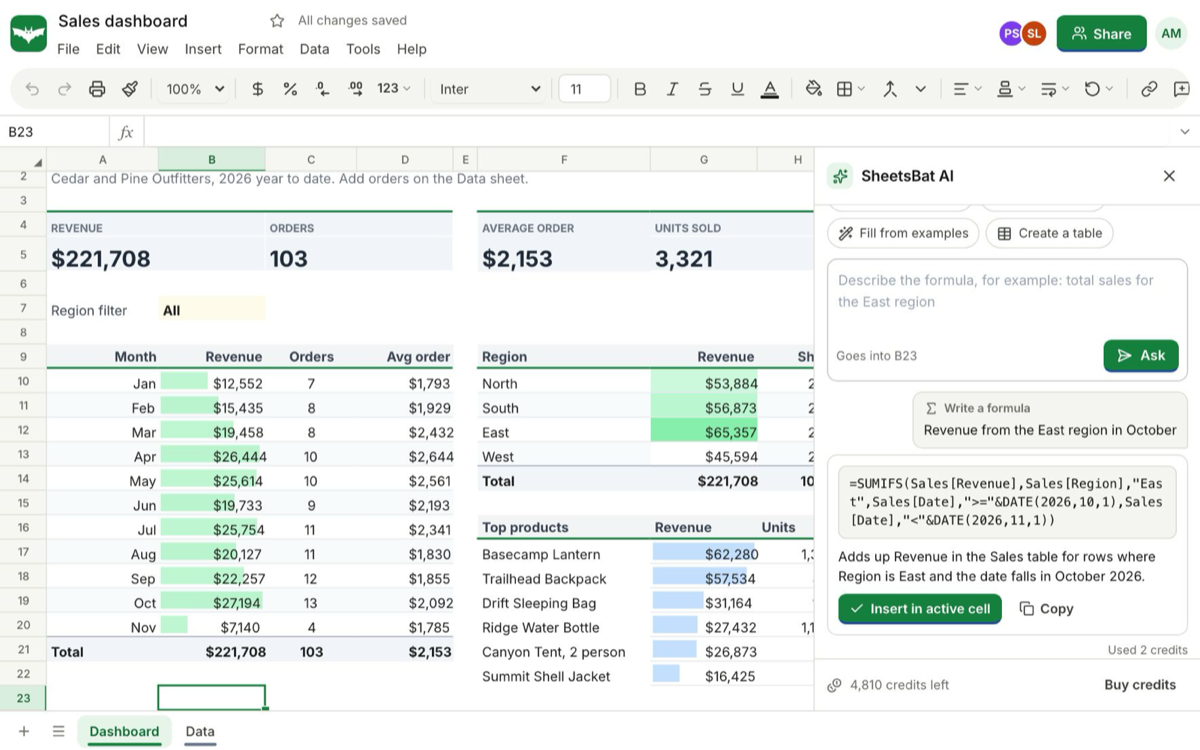
AI built into the sheet

Describe a result in plain words and SheetsBat AI writes the formula with your real headers and ranges. You see it before it goes in, and Undo takes it out.

  • Fill a column and ask about your data
  • Explain and fix formula errors
  • Ctrl+K command bar
SheetsBat AI writing a SUMIFS formula from a plain description on a sample dashboard
04

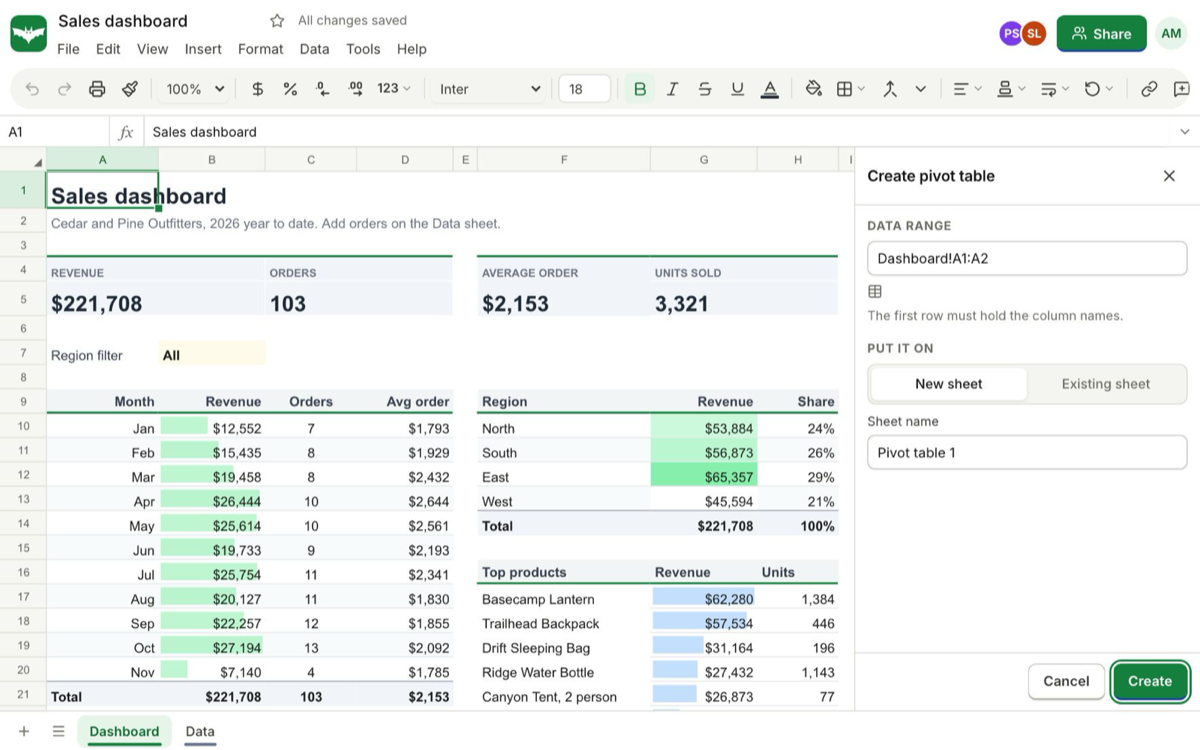
Pivot tables and slicers

Summarise thousands of rows by region, month or product. Drag fields into rows, columns and values, group dates and filter with slicers.

  • Sum, count, average and percent of total
  • Date grouping
  • On a new or existing sheet
Creating a pivot table from a sample sales sheet in SheetsBat
05

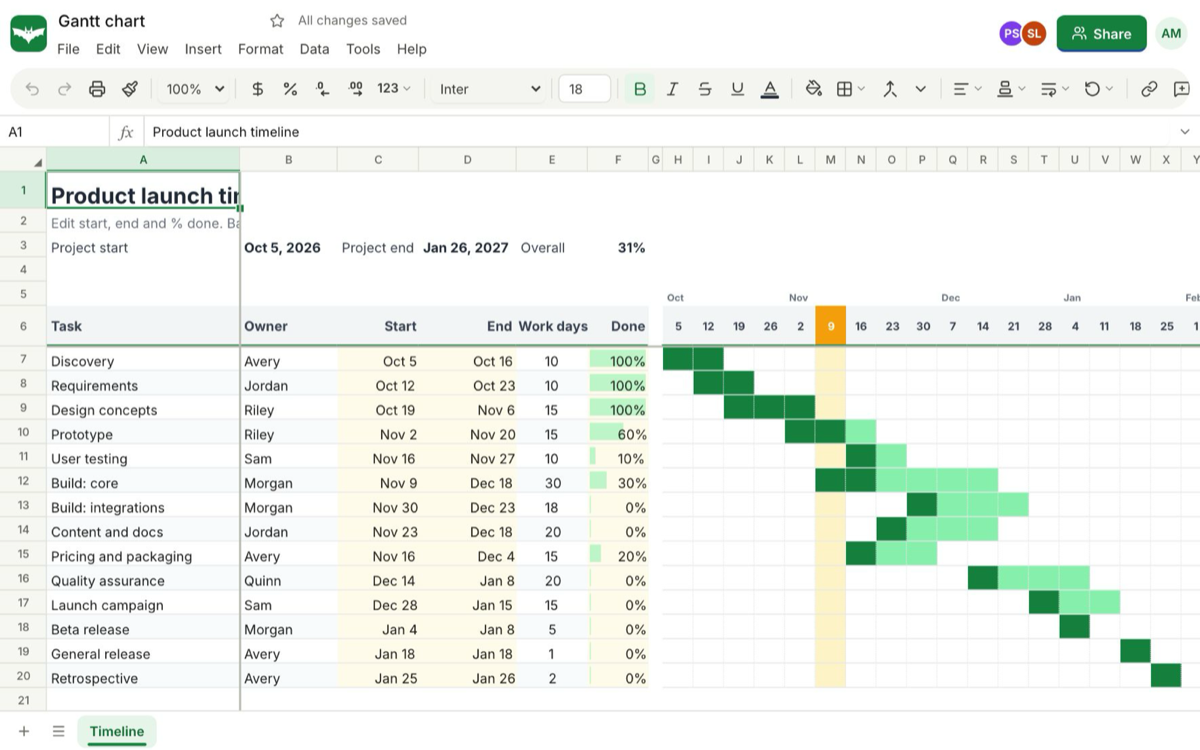
Templates that already work

Start from one of 73 free templates, like this Gantt chart, a budget, an invoice, a loan schedule or a dashboard, with the formulas and charts in place.

  • Finance, sales, projects and more
  • Conditional formatting built in
  • Add your numbers and go
A SheetsBat Gantt chart template with conditional formatting on a sample product launch plan
06

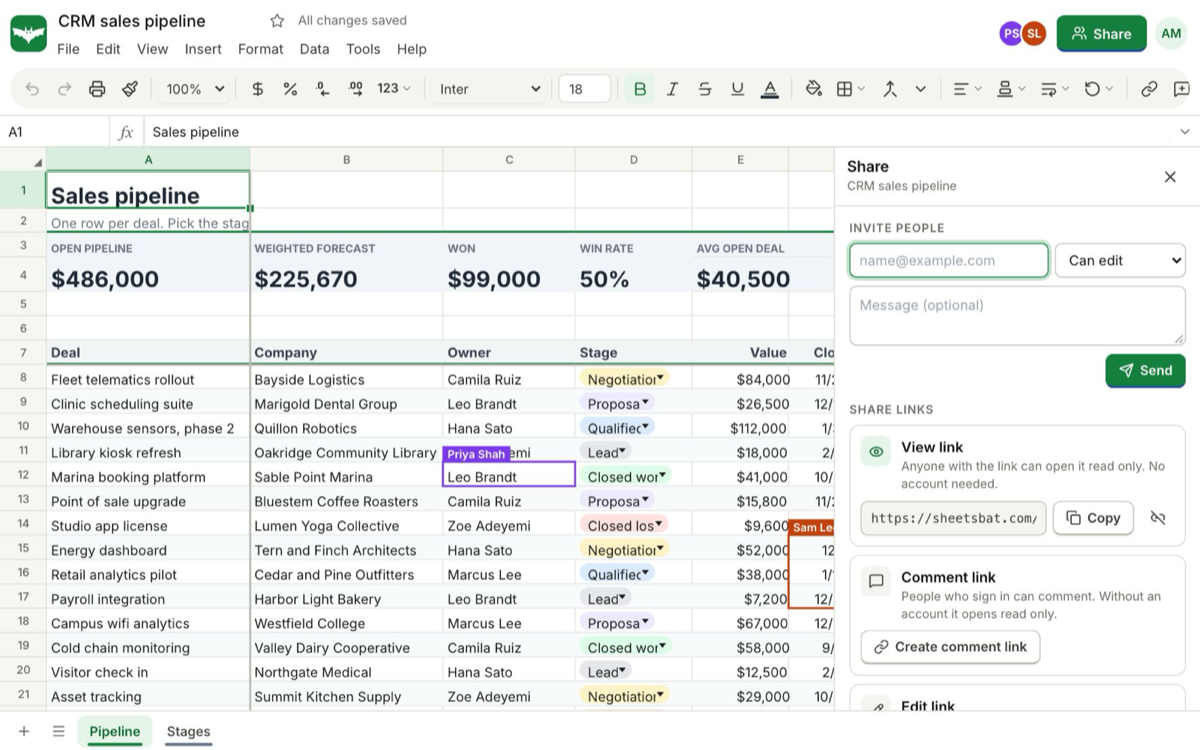
Edit together, live

Share a workbook with people or a link and edit it at the same time. See where others are working, comment on cells and restore any version.

  • Viewer, commenter and editor roles
  • Comment threads you can resolve
  • Named versions and one click restore
The SheetsBat share panel with people, roles and view, comment and edit links on a sample sales pipeline
07

73 free templates

Budgets, invoices, loan schedules, dashboards, trackers and planners, sorted by category, with the formulas, formatting and charts in place.

  • Every template is free
  • Working formulas and charts
  • Search by name or category
The SheetsBat template gallery with 73 free templates by category
Try it

Try a formula on a tiny sheet

Pick a formula or type your own. This page runs a handful of functions in your browser: SUM, AVERAGE, MIN, MAX, COUNT, COUNTIF, SUMIF, SUMIFS and XLOOKUP. SheetsBat calculates 536.

Result75,850
What SheetsBat does

Spreadsheets with every formula, properly

Every formula you know

XLOOKUP, FILTER, SUMIFS, LET, LAMBDA, GROUPBY and PIVOTBY among 536 functions, with dynamic arrays that spill, tables and named ranges.

AI in the sheet

Describe a result and get the formula, fill a column, ask about your data, explain and fix errors, or press Ctrl+K for a command.

Pivot tables and slicers

Drag fields into rows, columns and values, group dates, show percent of total and filter with slicers.

Charts and formatting

14 chart types that follow your data, plus colour scales, data bars, icon sets, dropdowns, checkboxes and validation.

Excel files in and out

Open .xlsx, .xlsm, .ods, CSV and TSV files with their formulas and formatting. Save as .xlsx, .ods, CSV, TSV or PDF.

Edit together, live

Share with people or a link, see where others are working, discuss cells in comment threads and restore any version.

Everything inside

The full SheetsBat feature list

Formulas

  • 536 functions, each with a reference page and examples
  • Dynamic arrays: FILTER, SORT, UNIQUE, SEQUENCE and more spill into neighbouring cells
  • LET and LAMBDA for formulas you can read and reuse
  • Tables with structured references like Sales[Revenue], and named ranges
  • Autocomplete that shows every argument as you type

Analyse and present

  • Pivot tables with date grouping and percent of total, and slicers
  • 14 chart types, including column, line, pie, combo, scatter, waterfall, funnel and treemap
  • Conditional formatting with colour scales, data bars, icon sets and formula rules
  • Dropdowns with coloured chips, checkboxes and validation rules
  • 73 free templates for budgets, invoices, loans, dashboards, trackers and planners

SheetsBat AI

  • Write a formula from a sentence, using your real headers and ranges
  • Formula suggestions as you type
  • Fill a column, ask questions about your data and build a table from a description
  • Explain any formula and fix errors
  • Ctrl+K command bar with edits you preview and can undo

Work together, anywhere

  • Live co-editing with presence
  • Viewer, commenter and editor roles for people and links
  • Comment threads you can resolve, and notes
  • Version history with named versions and one click restore
  • Built for touch on phones, and files from your OfficeBats Drive
How it works

Three steps in SheetsBat

  1. 1

    Open or start

    Open a blank sheet, a template or an Excel file. No account needed to try it.

  2. 2

    Build and analyse

    Write formulas, add charts and pivot tables, or ask SheetsBat AI for the formula you need.

  3. 3

    Share or download

    Edit together live, share a link with a role, or download as .xlsx, .ods, CSV or PDF.

Plans

SheetsBat on Free, Pro and Business

One OfficeBats plan covers SheetsBat and the six other apps. Pick Free, Pro or Business once.

SheetsBat on Free, Pro and Business
SheetsBatFreeProBusiness
Price, covers all seven apps$0$10.99 a month$19 a month
Workbooks25UnlimitedUnlimited
Cells per workbook500,0005 million5 million
Largest import10 MB50 MB50 MB
Version history7 daysA yearA year
Collaborators per workbook3100100
Every function, chart, pivot table and templateIncludedIncludedIncluded
Shared AI credits each month3005,00020,000

Free online spreadsheets with every formula

SheetsBat is a spreadsheet app that runs in any browser. It calculates 536 functions, from SUM and SUMIFS to XLOOKUP, FILTER, LET, LAMBDA, GROUPBY and PIVOTBY, with dynamic arrays that spill into the cells next to them. Function names, arguments and error values work the way spreadsheet people expect, so the formulas you know work the first time.

Your Excel files open just as they are, with their formulas, formatting, tables and rules, and download again as .xlsx, .ods, CSV or PDF. Add charts that follow your data, summarise thousands of rows with a pivot table and slicers, and let conditional formatting point out what needs attention.

AI that writes and explains formulas

Describe what you need in plain words and SheetsBat AI writes the formula with your real headers and ranges. It can also fill a column, answer questions about your data, explain a formula someone else wrote and fix errors. You see every change before it goes in, and Undo removes it.

Part of your OfficeBats account

Sign in to SheetsBat with your OfficeBats account. One plan covers SheetsBat and every other Bats app, spreadsheets live in the same Drive as your documents and PDFs, and AI features draw from one shared credit wallet.
SheetsBat questions

Is SheetsBat free?

Yes. The free plan includes 25 workbooks of up to 500,000 cells each, every function, chart, pivot table and template, live editing with 3 collaborators per workbook and your share of the AI wallet.

What does Pro unlock in SheetsBat?

Unlimited workbooks, 5 million cells per workbook, 50 MB imports, a year of version history and 100 collaborators per workbook, plus Pro in every other Bats app.

Can I open and save Excel files?

Yes. SheetsBat opens .xlsx, .xlsm, .ods, .csv and .tsv files with their formulas and formatting, and downloads workbooks as .xlsx, .ods, CSV, TSV or PDF.

Do I need an account to try it?

No. Open a blank sheet or a template and start typing. Create a free account when you want to save it, share it and open it on other devices.

Does the AI see my whole workbook?

No. It receives what the task needs: the sheet name, headers, a small sample of rows and your selection. You see each change before it goes in, and Undo takes it out.

Open SheetsBat with your OfficeBats account

Create a free account once and use it for SheetsBat and every other Bats app.