Products
PDFbatEdit, convert and sign PDFs
DocsBatWrite and edit documents
FormsBatForms, surveys and payments
BooksBatInvoices and accounting
Buildan.appAI website and app builder
SlidesBatAI presentations and memos
SheetsBatSpreadsheets with every formula
DriveOne drive for every app
OfficeBats
Pricing Blog Security About
Create your free accountSign in
SlidesBatslidesbat.com

Presentations, designed for you

Describe your talk or upload a document. SlidesBat writes an outline you can edit, then designs every slide with real layouts, charts and photos. Polish it in a full slide editor, present from anywhere and export to PowerPoint or PDF.

Try everything free for 3 days, no card needed.

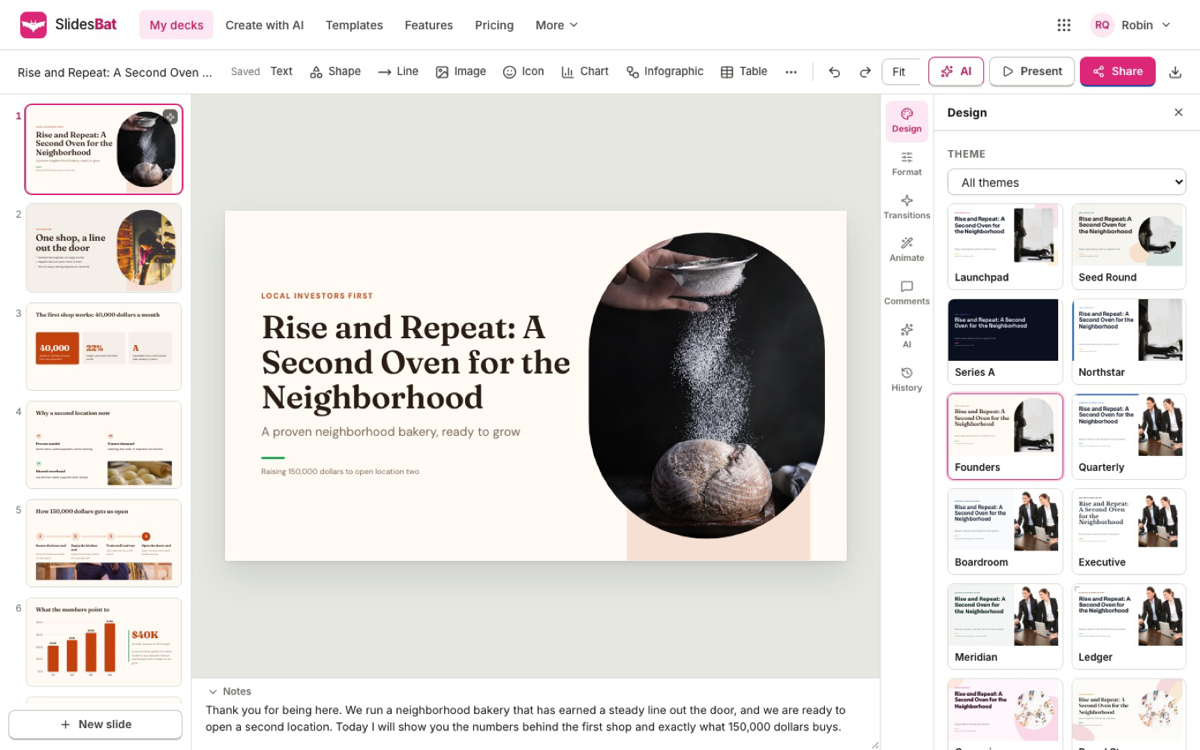
The SlidesBat slide editor with a sample bakery pitch deck and the theme picker open

A real screenshot of SlidesBat with sample data

47original themes
24chart types, plus 11 infographics
34slide transitions
55animations
AI presentation maker

From one sentence to a designed deck

Scroll through the real app. Every screen below is a screenshot of SlidesBat with sample data.

01

A full slide editor in the browser

Click anything to change it. Drag with snap guides, resize, rotate, align, group and lock, and switch the whole deck to another of 47 themes in one click.

  • Charts, tables, shapes, icons, photos, video and code
  • Speaker notes on every slide
  • Undo, autosave and version history
The SlidesBat slide editor with a sample bakery pitch deck and the theme picker open
02

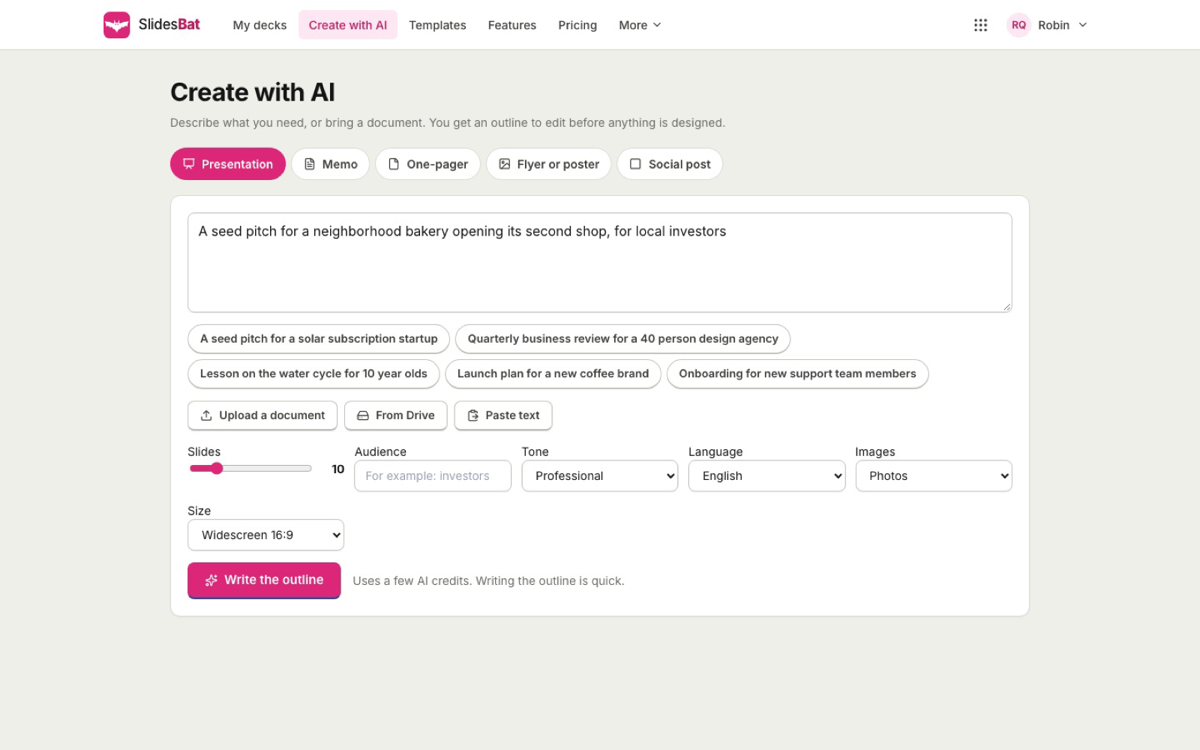
Make a presentation with AI

Describe the talk or upload a Word, PDF, PowerPoint or Markdown file. SlidesBat writes an outline you can edit, then designs every slide with real layouts, photos and notes.

  • Choose slides, audience, tone and language
  • Edit the outline before anything is designed
  • Uses your shared AI credits
Create with AI in SlidesBat: a one sentence brief for a sample pitch deck with slides, tone and language settings
03

Charts and infographics that stay editable

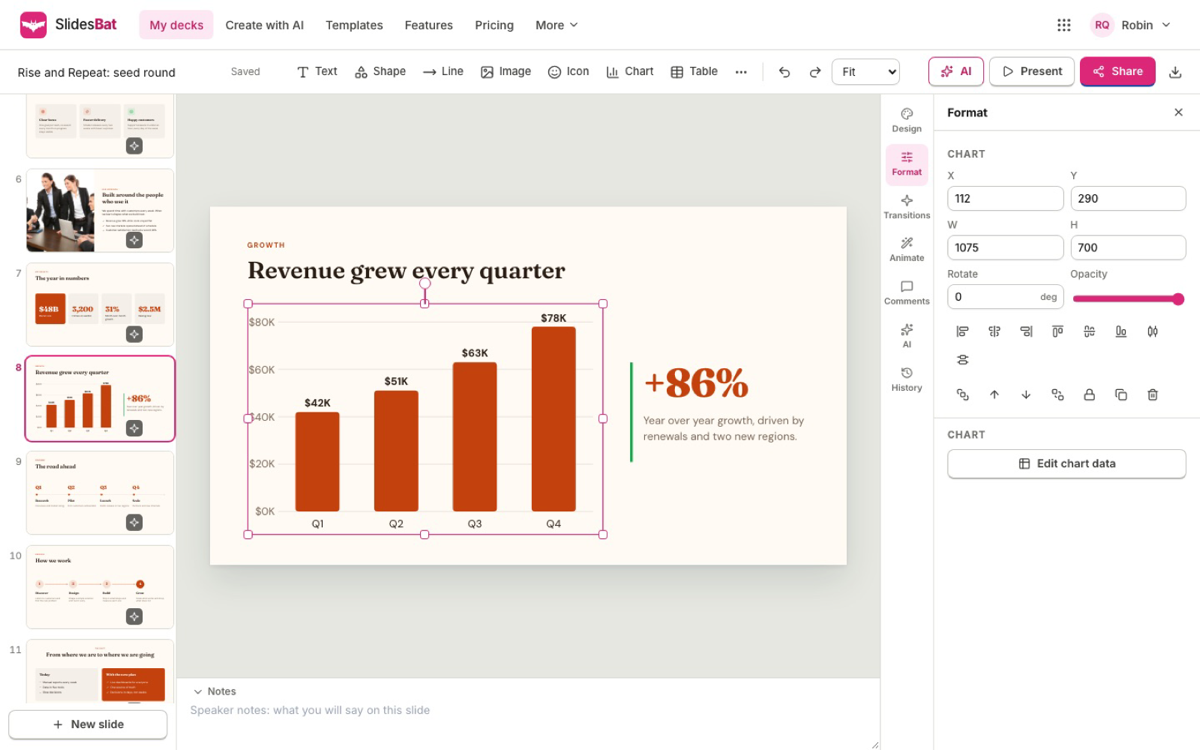
Pick from 24 chart types and 11 infographic blocks. Paste numbers from a spreadsheet or import a CSV file, and edit the data at any time.

  • The AI only charts numbers you give it
  • Maps, funnels, waterfalls and more
  • Native charts in PowerPoint exports
A SlidesBat slide with an editable column chart selected and its format panel open
04

Transitions and animations

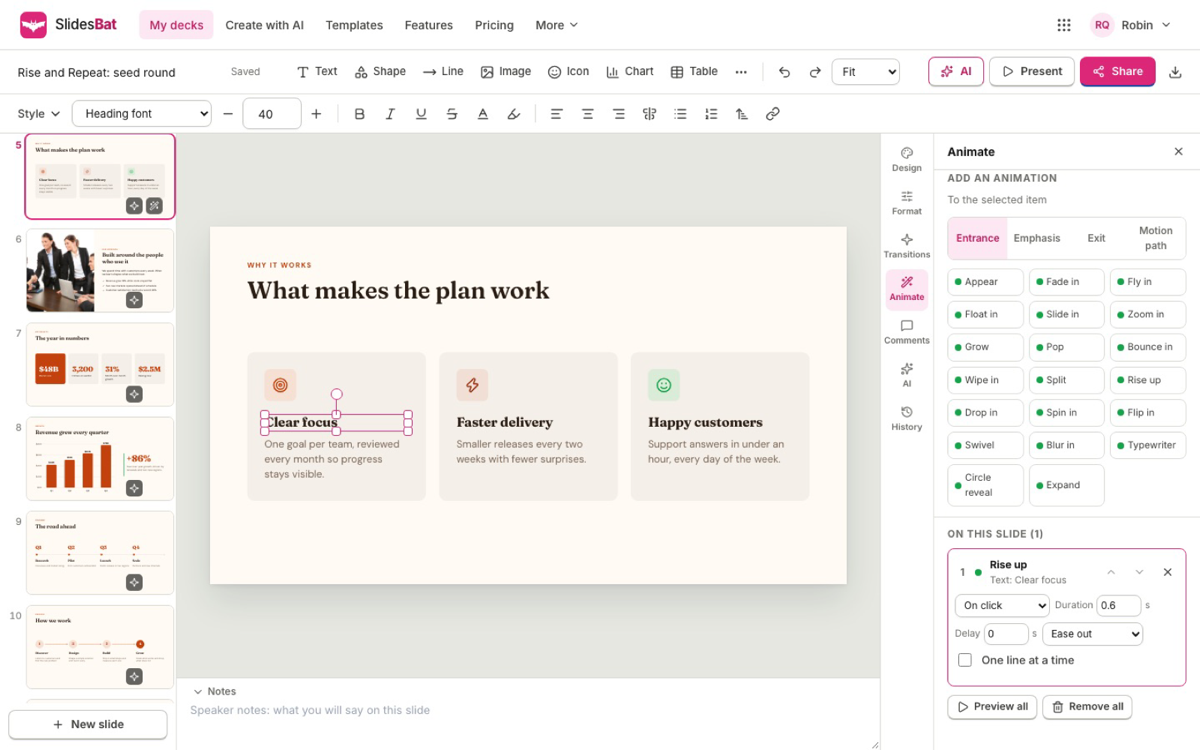
34 slide transitions, including magic move, and 55 animations for entrance, emphasis, exit and motion paths, with timing for each one.

  • Build lists one line at a time
  • Preview every effect live
  • An animation pane per slide
The SlidesBat animation pane with entrance, emphasis, exit and motion path animations on a sample slide
05

Present from anywhere

Full screen shows with a presenter view: your notes, the next slide, a timer and a laser pointer. Use your phone as a remote for the big screen.

  • Keyboard, clicker and swipe
  • View, comment and edit links
  • Embed a deck on a website
SlidesBat presenter view with the current slide, the next slide, speaker notes and a timer
06

Memos on your letterhead

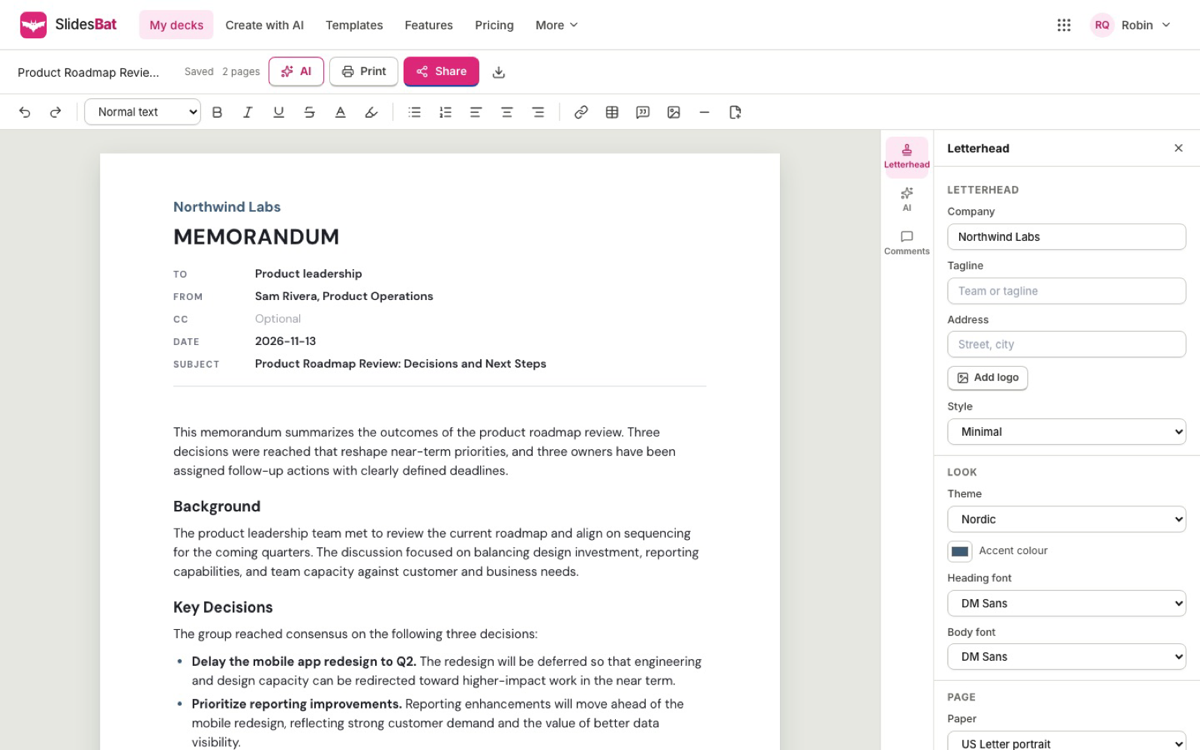
Paste your notes and get a clear memo with To, From, Date and Subject, then export it as PDF or Word with your letterhead and page numbers.

  • 10 memo templates
  • Five letterhead styles with your logo
  • Rewrite any part with AI
A sample memo in SlidesBat with a letterhead and the letterhead settings panel
Try it

Preview a few slide transitions

Pick a transition to play it between two sample slides. This preview runs in your browser. SlidesBat has 34 transitions, including magic move, and 55 animations.

Transition

In SlidesBat you set a transition per slide or for the whole deck, and preview it live in the editor.

Sample deckQuarterly reviewWhere we are and what comes next
What SlidesBat does

AI presentations and memos, properly

Decks from a prompt or a file

Describe the talk or upload a Word, PDF, PowerPoint or Markdown file. You edit the outline first, then every slide gets a real layout, photos and speaker notes.

A full slide editor

Drag with snap guides, resize, rotate, align, group and lock. Rich text, shapes, 2,000 icons, images, tables, video and code blocks.

Charts and infographics

24 chart types with editable data and 11 infographic blocks. Paste from a spreadsheet or import a CSV file. The AI only charts numbers you give it.

Transitions and animations

34 transitions, including magic move, and 55 entrance, emphasis, exit and motion path animations, with timing for each one.

Present from anywhere

Full screen shows with a presenter view: notes, next slide, timer and a laser pointer. Drive the big screen from your phone.

Memos, flyers and posts

AI memos on your letterhead with PDF and Word export, plus one-pagers, flyers, posters and social posts in the same editor.

Everything inside

The full SlidesBat feature list

Create with AI

  • Decks from a prompt, or from a Word, PDF, PowerPoint or Markdown file
  • An outline you can reorder and rewrite before any slide is designed
  • Choose the number of slides, audience, tone, language and images
  • AI photo ideas for each slide, and rewrites that make text shorter, warmer or more formal

Design and edit

  • 47 original themes for pitch decks, reviews, lessons, reports, portfolios and more
  • A theme editor for your own colours and fonts
  • Snap guides, align, group, lock, undo, autosave and version history
  • Stock photos and illustrations licensed for commercial use, and 2,000 icons
  • Letter and A4 flyers, posters, one-pagers, square posts, stories and portrait posts

Present and share

  • Presenter view with notes, next slide, timer and a laser pointer
  • A phone remote, plus keyboard, clicker and swipe
  • View links with optional downloads, and comment and edit links
  • Live editing with others, with comments and version history
  • Embed codes to put a deck on a website

Files in and out

  • PowerPoint export with editable text, shapes, tables, native charts and speaker notes
  • PDF with vector text and charts, one page per slide, and PNG images
  • Memos to PDF and Word with letterhead and page numbers
  • Import .pptx files and Markdown outlines
  • Every export saved to your OfficeBats Drive
How it works

Three steps in SlidesBat

  1. 1

    Describe or upload

    Say what the talk is about, or upload a document. Pick the number of slides, the tone and the language.

  2. 2

    Shape the outline

    Reorder slides and rewrite points. SlidesBat then designs every slide with a theme, layouts, charts and photos.

  3. 3

    Present or export

    Present with the presenter view and your phone as a remote, share a link, or download PowerPoint, PDF or PNG.

Plans

SlidesBat on Free, Pro and Business

One OfficeBats plan covers SlidesBat and the six other apps. Pick Free, Pro or Business once.

SlidesBat on Free, Pro and Business
SlidesBatFreeProBusiness
Price, covers all seven apps$0$10.99 a month$19 a month
Presentations, memos and pages10UnlimitedUnlimited
Every template, layout and editor featureIncludedIncludedIncluded
Exports to PowerPoint, PDF, PNG and Word20 a dayUnlimitedUnlimited
Exports without the SlidesBat markNot includedIncludedIncluded
Saved versionsLast 10Last 200Last 200
Largest upload10 MB40 MB40 MB
Live editing with othersIncludedIncludedIncluded
Shared AI credits each month3005,00020,000

An AI presentation maker with a real slide editor

SlidesBat turns a short description or an existing document into a presentation. It writes an outline first, so you decide what the deck says before anything is designed. Then it lays out every slide with one of 47 original themes, real layouts, photos, icons and speaker notes.

Everything stays editable. The slide editor has snap guides, alignment, grouping and locking, tables, video and code blocks, and charts whose data you can change at any time. Add one of 34 transitions or 55 animations, then present with a presenter view and your phone as a remote.

PowerPoint and PDF, without the clean up

Download a deck as a PowerPoint file with editable text, shapes, tables and native charts, as a PDF with vector text, or as PNG images for social posts. Open existing .pptx files to keep working on them in the browser.

Memos, one-pagers and flyers too

The same editor makes memos on your letterhead, one-pagers, flyers, posters and social posts. SlidesBat is part of OfficeBats, so one account and one plan cover it and every other Bats app, and AI features draw from one shared credit wallet.
SlidesBat questions

Is SlidesBat free?

Yes. The free plan keeps up to 10 presentations and memos with every template, layout and editor feature, 20 exports a day with a small SlidesBat mark, live editing with others and your share of the AI wallet.

What does Pro unlock in SlidesBat?

Unlimited presentations and memos, unlimited exports without the SlidesBat mark, the last 200 saved versions and 40 MB uploads, plus Pro in every other Bats app.

Can I open my PowerPoint files?

Yes. Import a .pptx file to keep editing it in the browser, and export back to PowerPoint at any time with editable text, shapes, tables and charts.

Will the AI make up numbers for my charts?

No. SlidesBat only charts numbers you give it. Paste data from a spreadsheet or import a CSV file, and every chart keeps its data editable.

Can several people edit a deck at once?

Yes. Share an edit link or invite people, and everyone works on the same deck live, with comments and version history. Comment and edit links ask people to sign in.

Open SlidesBat with your OfficeBats account

Create a free account once and use it for SlidesBat and every other Bats app.