Products
PDFbatEdit, convert and sign PDFs
DocsBatWrite and edit documents
FormsBatForms, surveys and payments
BooksBatInvoices and accounting
Buildan.appAI website and app builder
SlidesBatAI presentations and memos
SheetsBatSpreadsheets with every formula
DesignBatDesigns, photos and motion with AI
DriveOne drive for every app
OfficeBats
Pricing Blog Security About
Create your free accountSign in
DesignBatdesign.officebats.com

Design, photos and motion, with AI inside

A design editor, a full photo editor and a motion timeline in one browser app. Start from 1,125 templates or a sentence, edit photos with layers or plain words, animate with keyframes, and export for screen, print or video.

Try everything free for 3 days, no card needed.

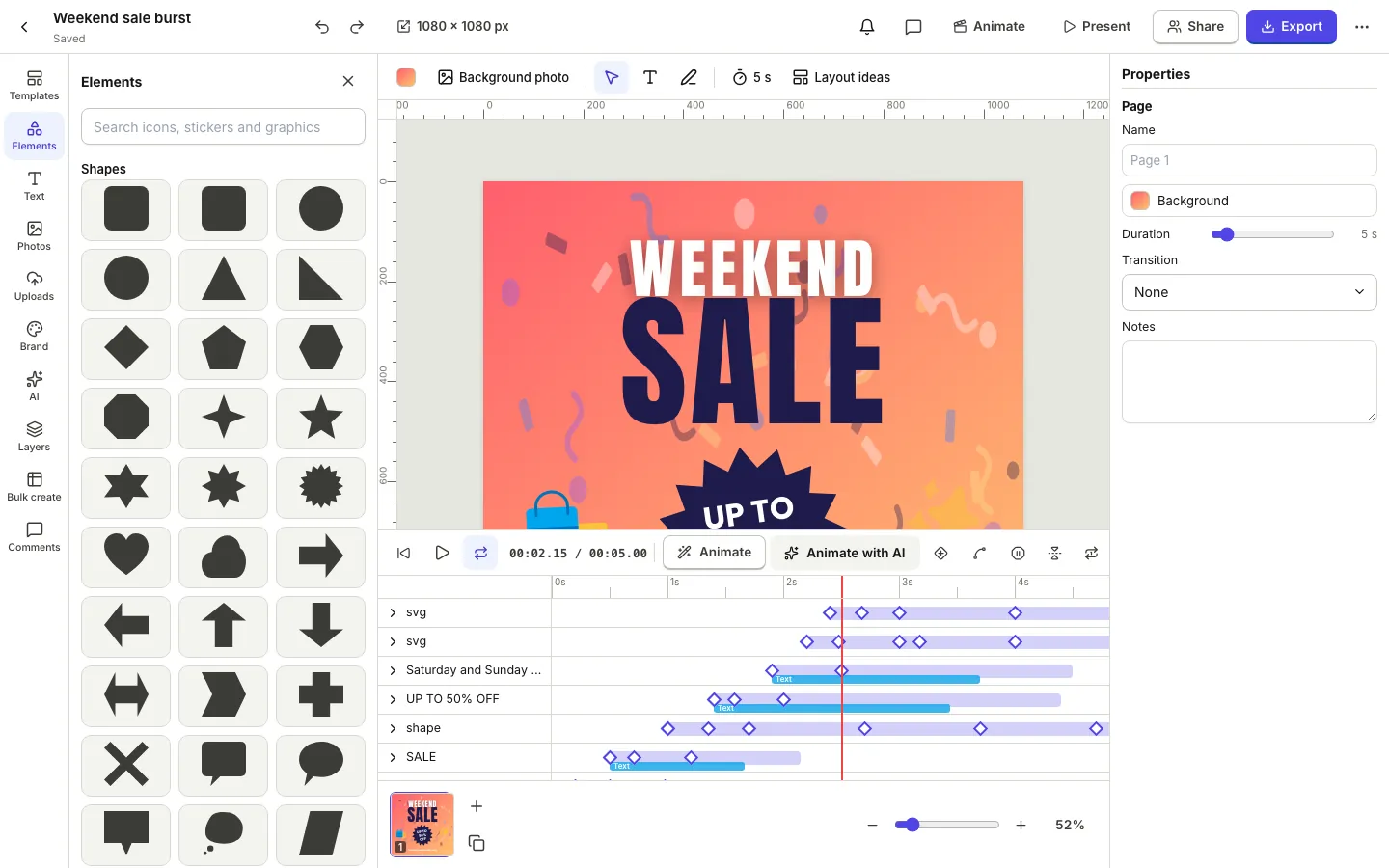
The DesignBat editor with an animated Weekend sale poster and the motion timeline open, showing keyframes for each layer

A real screenshot of DesignBat with sample data

1,125templates, 282 animated
221fonts
63size presets
46motion presets
Design, photo and motion editor

Design it, edit the photo, make it move

Scroll through the real app. Every screen below is a screenshot of DesignBat with sample data.

01

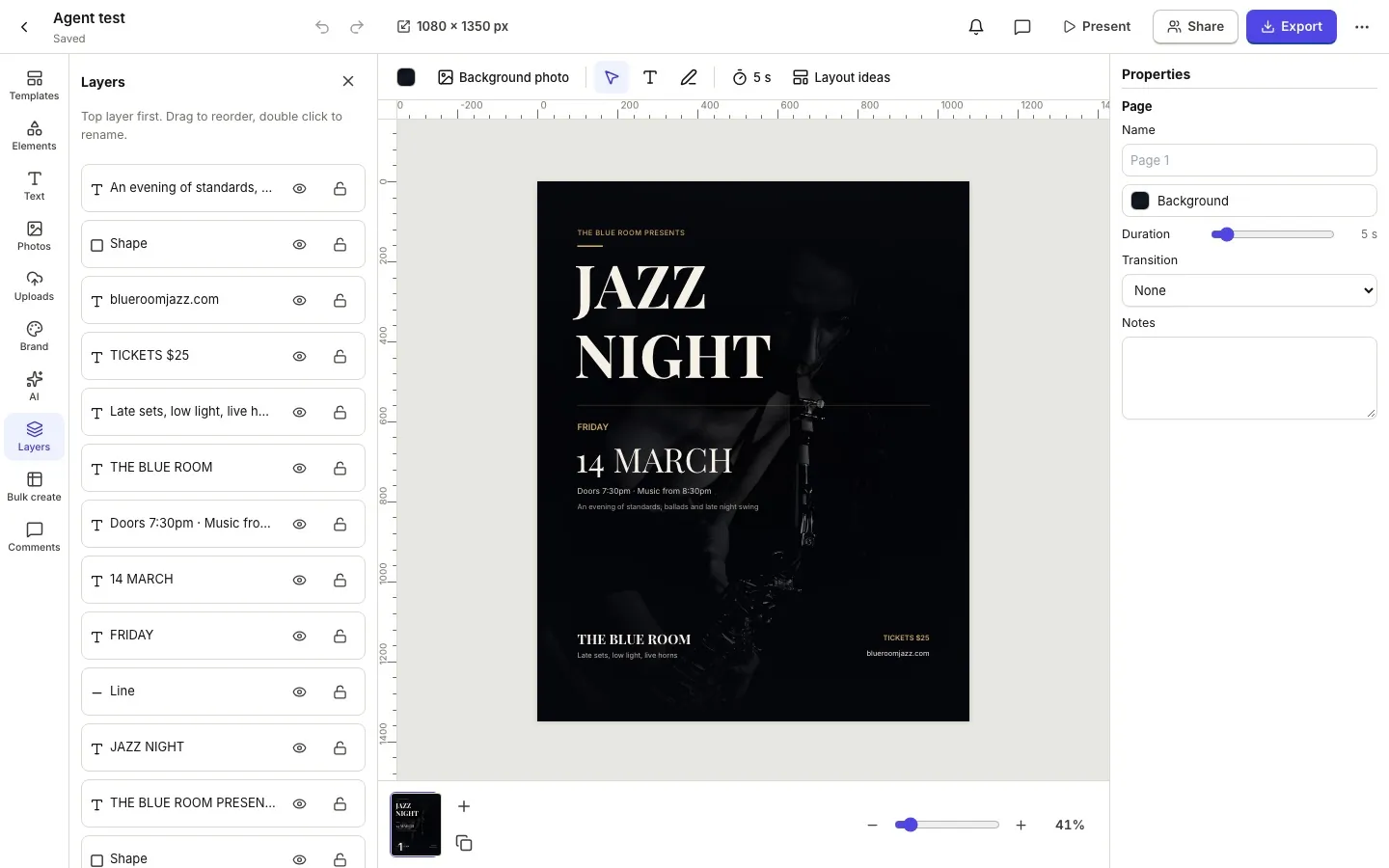
A design editor for every format

Social posts, stories, posters, flyers, thumbnails and slides at 63 preset sizes or your own. Layers, masks, frames, charts, tables and 221 fonts, with snapping, rulers and guides.

  • 1,125 templates, 282 of them animated
  • Text effects, curved text and gradients
  • Icons, stickers, shapes and photo frames
The DesignBat design editor with a Jazz Night poster, the Layers panel on the left and page properties on the right
02

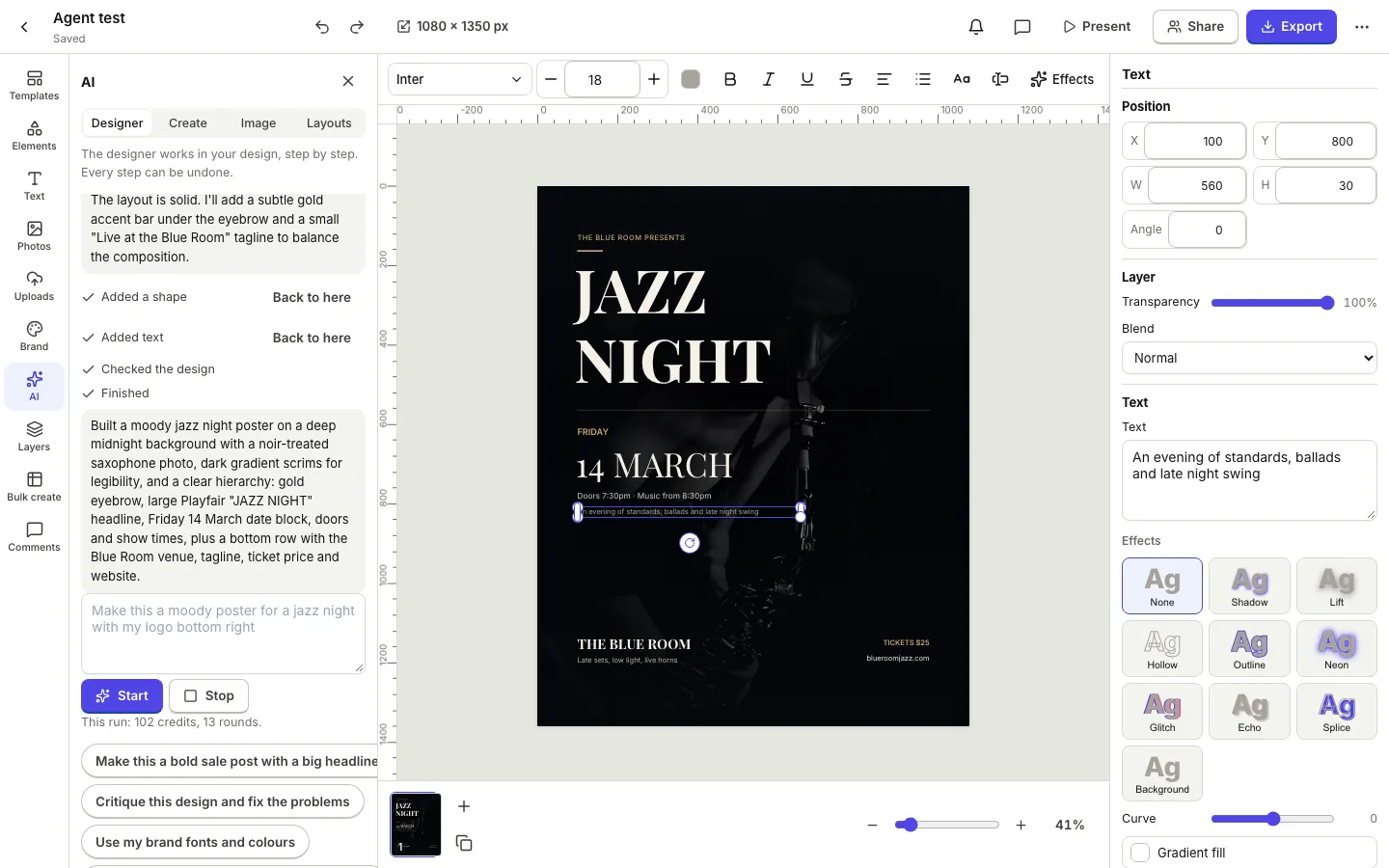
An AI designer that works in your file

Describe the design and the AI designer builds it step by step in real, editable layers. Every step can be undone, and you can stop it at any time.

  • Design from a prompt or a website you name
  • Writing help, layout ideas and resize with AI
  • Uses your shared AI credits
The DesignBat AI designer building a jazz night poster step by step, with each finished step listed and a Back to here button
03

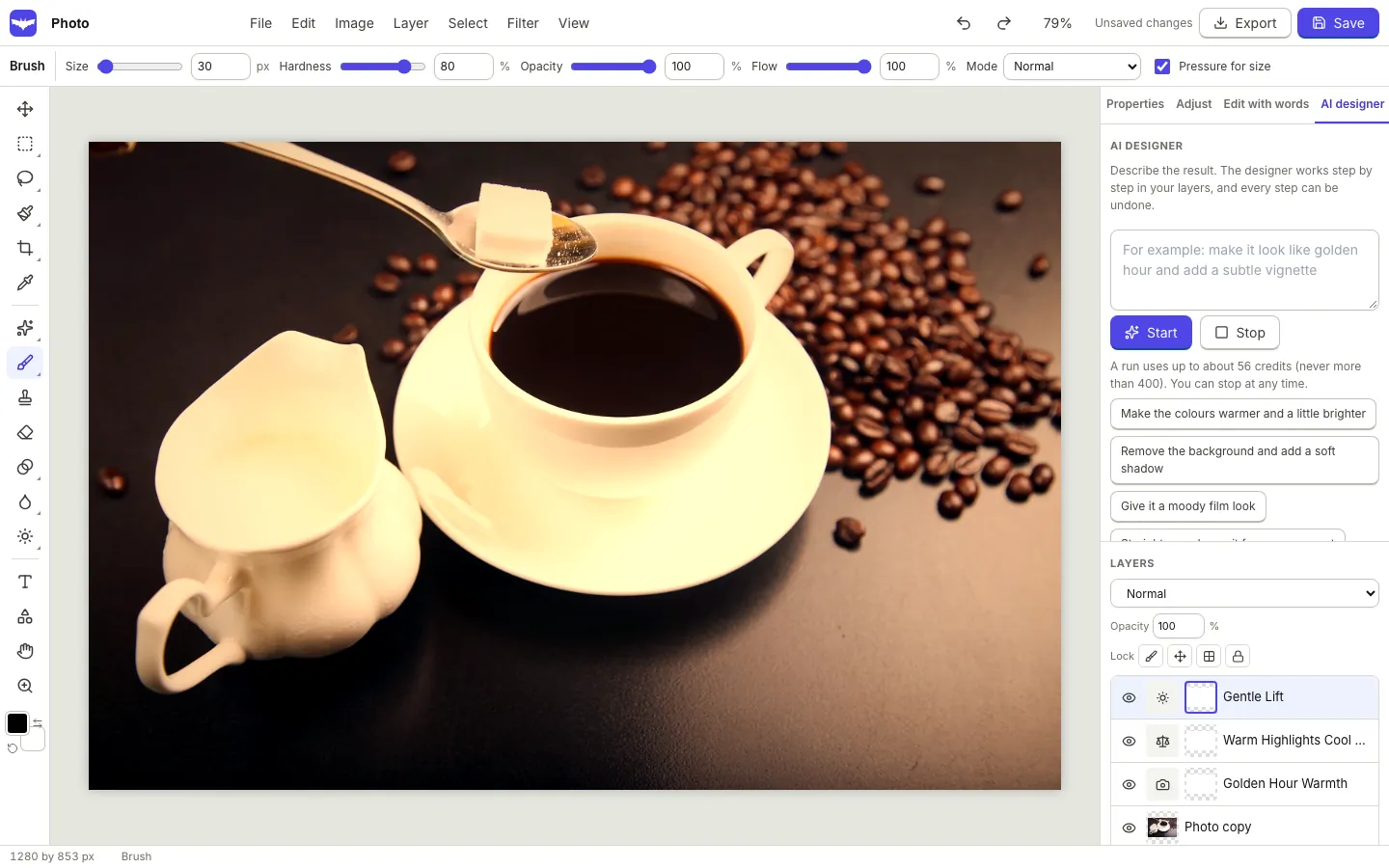
A full photo editor

Layers, masks and adjustment layers, every selection tool, healing and clone, 16 adjustments, filters and liquify. Open PSD files and save layered PSD again.

  • Edit with words, generative fill and expand
  • Background replace and split into layers
  • Results arrive as new layers
The DesignBat photo editor with a coffee photo, the AI designer panel and warm adjustment layers it added
04

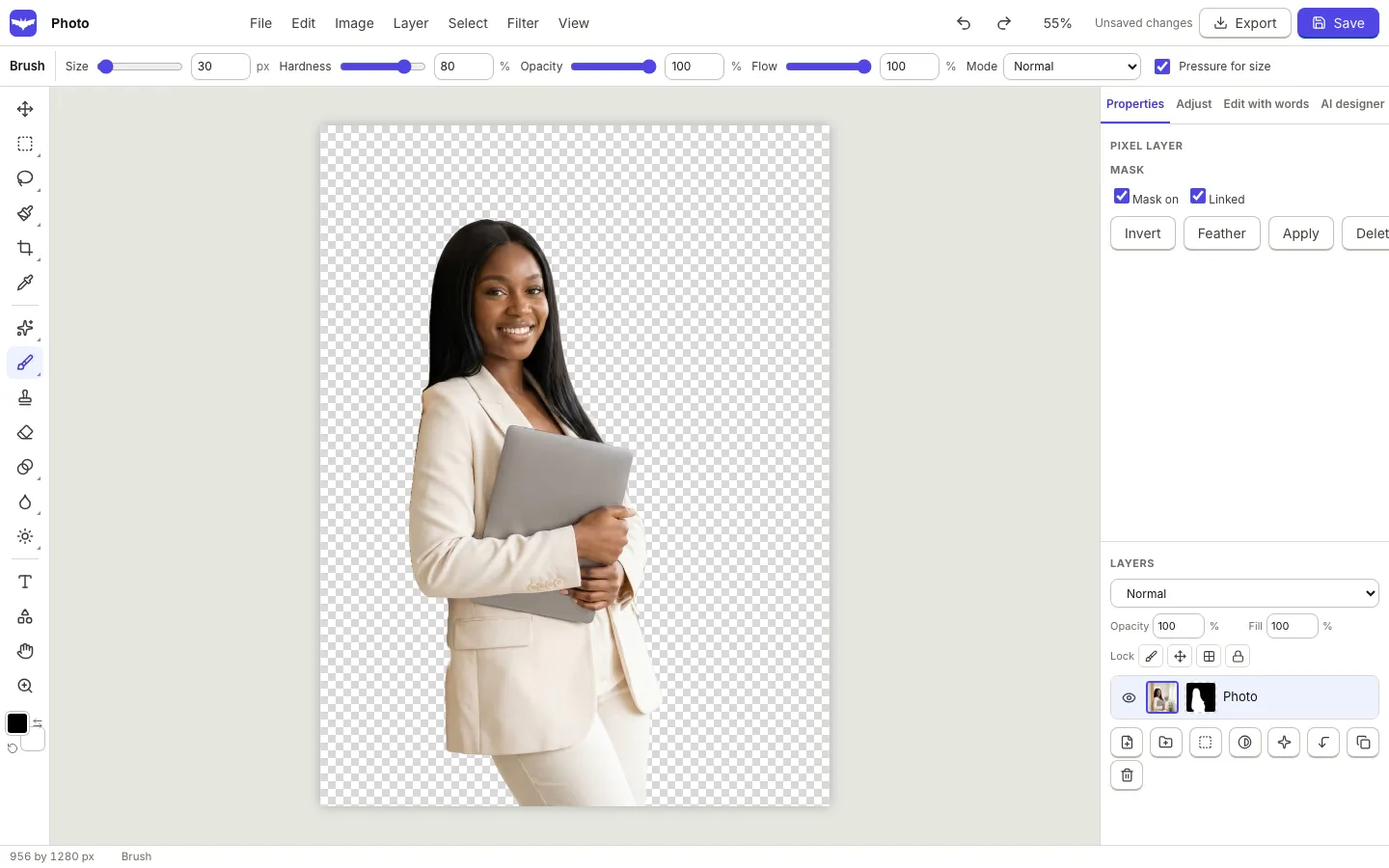
Backgrounds out in one click

Remove a background in the browser, then refine the edge with a mask you can paint. Put the cut out on a new scene, a colour or a frame.

  • Select subject and select by words
  • Refine edge with colour cleaning
  • Batch background removal for many photos
A portrait in the DesignBat photo editor with the background removed and a layer mask on the photo layer
05

A motion timeline

Animate any design with keyframes on a real timeline, or start from 46 presets and animate text by letter, word or line. Add music and sync to the beat.

  • Easing curves and a value graph
  • Video and Lottie layers
  • Export MP4, GIF, WebM and animated WebP
The DesignBat editor with an animated Weekend sale poster and the motion timeline open, showing keyframes for each layer
06

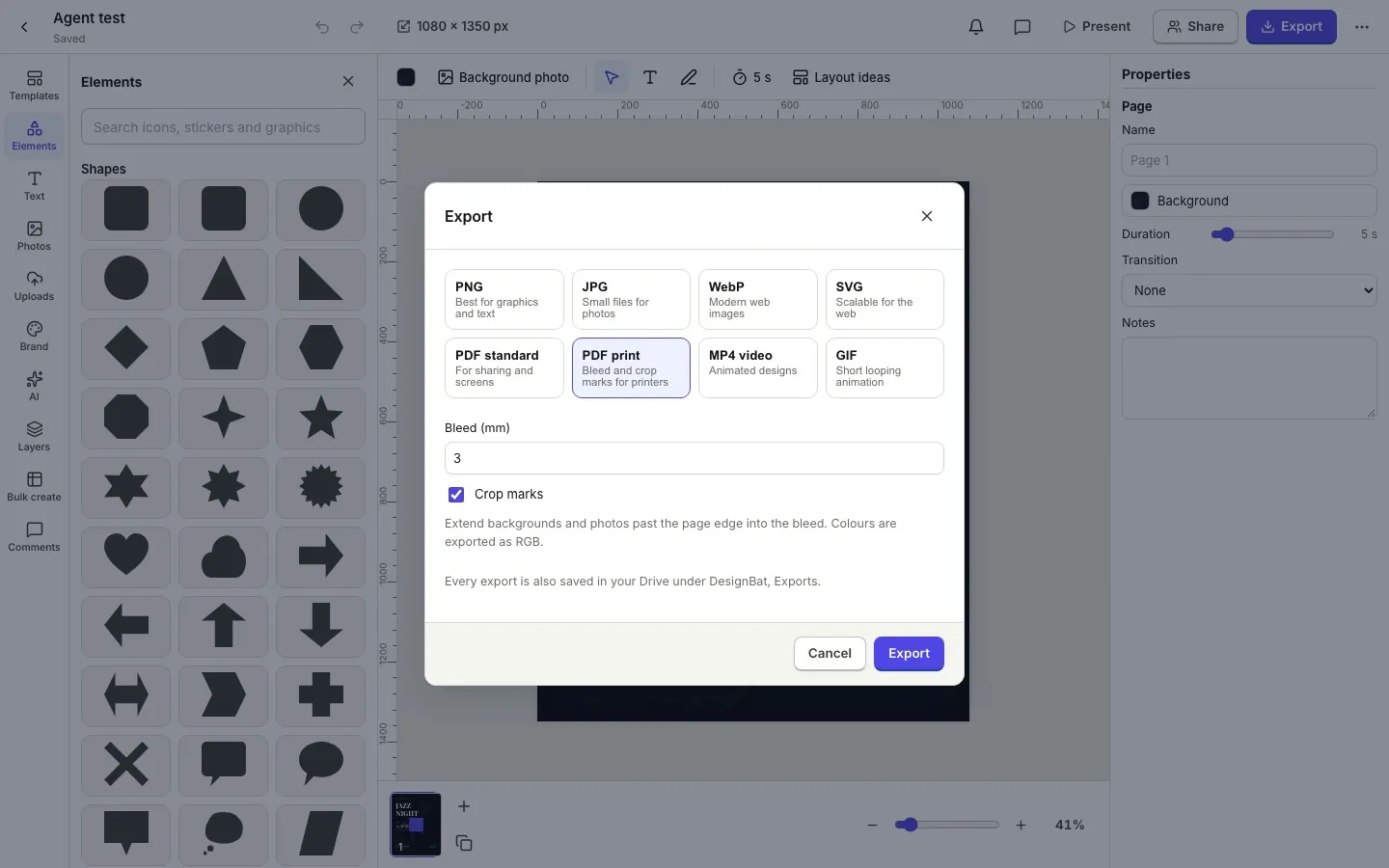
Exports for screen and print

PNG with a transparent background, JPG, WebP, SVG and PDF, plus a print PDF with bleed and crop marks at the physical size. Every export is also saved to your Drive.

  • A zip for many pages
  • Scale and quality per export
  • Saved to DesignBat, Exports in the Drive
The DesignBat Export dialog with PDF print selected, 3 mm bleed and crop marks turned on
07

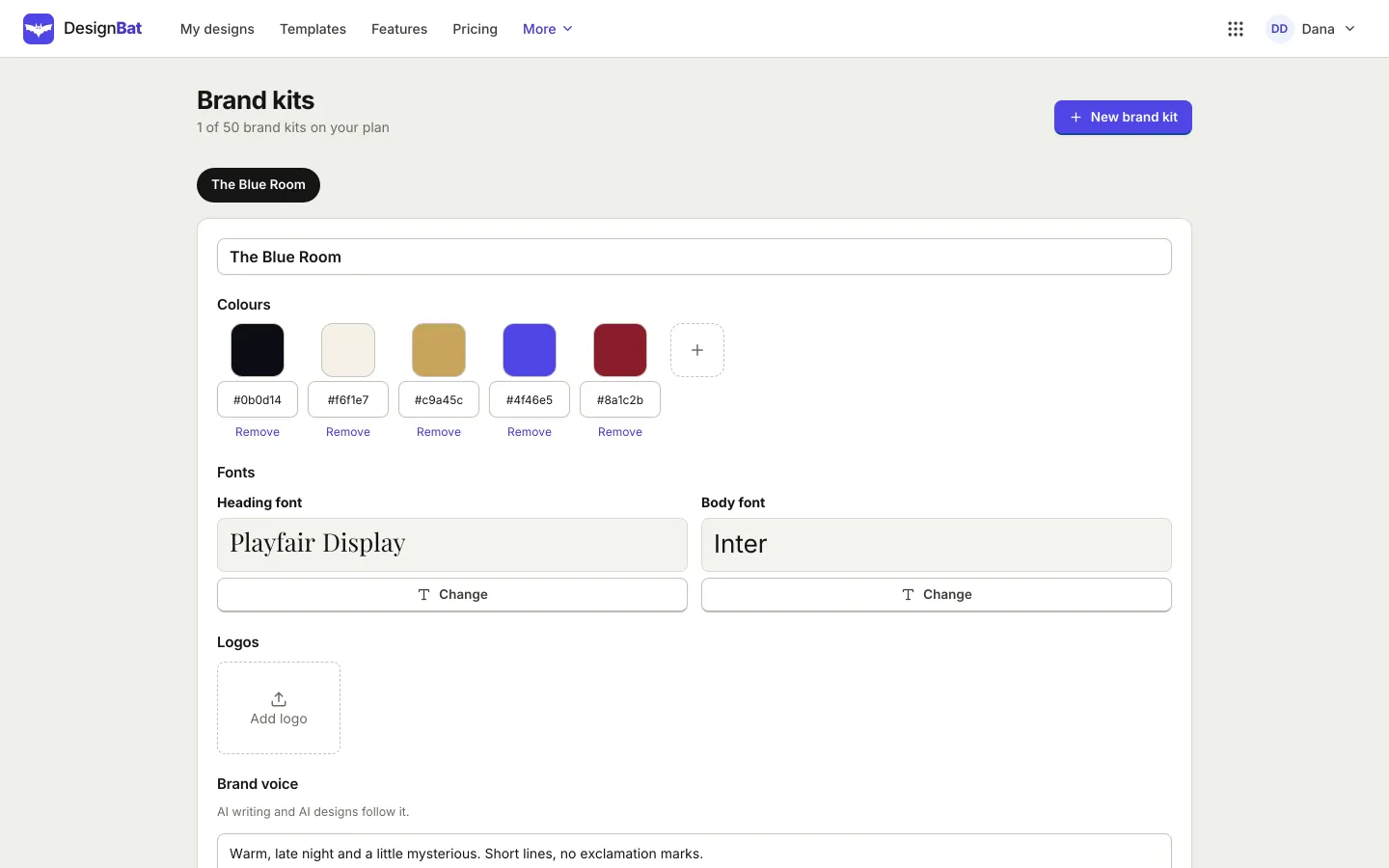
Brand kits and bulk create

Keep your colours, fonts, logos and brand voice in a kit and apply them in one click. Make many versions of a design at once from a CSV file.

  • A brand fit check with one click fixes
  • Live co-editing, comments and share links
  • Version history with a side by side view
A DesignBat brand kit with five brand colours, Playfair Display and Inter fonts, a logo slot and a brand voice
Try it

See real AI photo edits, before and after

Pick an edit and drag the handle. These are real results from DesignBat on the same photo, with the prompt that made each one. In the app every result arrives as a new layer, so the original stays untouched.

AI edit
Promptmake it golden hour with warm low sunlight

AI edits need an OfficeBats account and use your shared AI credits. This page only shows saved results; nothing runs here.

A photo of a coffee cup on a cafe table, before any edit
The same cafe photo after edit with words in DesignBat with the prompt: make it golden hour with warm low sunlight
BeforeEdit with words
What DesignBat does

Designs, photos and motion with AI, properly

A design editor for every size

Social posts, stories, thumbnails, posters, flyers and slides at 63 preset sizes or your own, with layers, masks, frames, charts, tables and 221 fonts.

A full photo editor

Layers, masks, adjustment layers, every selection tool, healing and clone, 16 adjustments, filters and liquify. PSD files open with their layers.

AI that edits for you

Edit a photo with words, fill or expand it, replace the background, generate images, split a photo into layers, or let the AI designer build a design step by step.

Motion on a real timeline

Keyframes for every property, easing curves, 46 presets, text by letter, word or line, music with beat sync, and MP4, GIF and WebM export.

Ready for print

Print PDFs with bleed and crop marks at the physical size, sizes in mm or inches at a DPI, and checks for tiny text, resolution and the safe zone.

Brand kits and teamwork

Colours, fonts, logos and brand voice in a kit, bulk create from a CSV file, live co-editing, comments and version history.

Everything inside

The full DesignBat feature list

Design editor

  • 1,125 templates in 19 categories, 282 of them animated
  • 63 size presets, plus custom sizes in px, mm or inches
  • Layers, groups, masks, 22 frame shapes, photo grids and crop
  • 221 fonts and your own uploads, text effects and curved text
  • Icons, stickers, shapes, 24 chart types, tables and QR codes

Photo editor

  • Pixel, text, shape and adjustment layers with masks and blend modes
  • Every selection tool, including select subject and select by words
  • Healing, spot healing, clone stamp, dodge, burn and red eye
  • 16 adjustments, 16 filters, liquify, warp and perspective crop
  • Open PSD and TIFF, save PNG, JPG, WebP, TIFF and layered PSD

AI, with your shared credits

  • Design from a prompt, with real editable layers
  • The AI designer: works step by step, every step undoable
  • Edit with words, generative fill, remove and expand
  • Background replace, upscale, restore, relight and image generation
  • Split a photo into editable layers, and animate with AI

Motion, export and teamwork

  • Timeline with keyframes, easing curves and 46 presets
  • MP4 with sound, WebM, GIF, animated WebP and PNG frames
  • PNG, JPG, WebP, SVG, PDF and print PDF with bleed and crop marks
  • Every export saved to your Drive, in DesignBat, Exports
  • Live co-editing, comments, share links, brand kits and bulk create from CSV
How it works

Three steps in DesignBat

  1. 1

    Start

    Pick a template or one of 63 sizes, open a photo, or describe what you want and let AI lay it out.

  2. 2

    Design and edit

    Change text, colours and photos, retouch in the photo editor, apply your brand kit and add motion if you like.

  3. 3

    Export or share

    Download PNG, PDF, print PDF, MP4 or GIF, share a link, or edit together live. Every export lands in your Drive.

Plans

DesignBat on Free, Pro and Business

One OfficeBats plan covers DesignBat and the seven other apps. Pick Free, Pro or Business once.

DesignBat on Free, Pro and Business
DesignBatFreeProBusiness
Price, covers all eight apps$0$10.99 a month$19 a month
Designs20UnlimitedUnlimited
Exports a day15UnlimitedUnlimited
Exports without the DesignBat markNot includedIncludedIncluded
AI actions a day10300300
Brand kits15050
Largest export scale2x4x4x
Longest video export15 seconds2 minutes2 minutes
Saved versionsLast 10Last 200Last 200
Largest upload15 MB60 MB60 MB
Every template, font, tool and the photo editorIncludedIncludedIncluded
Shared AI credits each month3005,00020,000

An online design editor, photo editor and motion editor in one

DesignBat is a browser app for everything visual a small business or creator makes: social posts and stories, YouTube thumbnails, posters, flyers, menus, invitations, business cards and short videos. Start from one of 1,125 original templates, pick one of 63 sizes or type your own in pixels, millimetres or inches, and edit with layers, masks, frames and 221 fonts.

When a photo needs more than a crop, open it in the photo editor. It has layers and masks, adjustment layers, every selection tool, healing and clone, 16 adjustments, filters and liquify, and it opens PSD files with their layers.

AI that works in your layers

Describe a change and DesignBat edits the photo with words, fills a selection, expands the frame or replaces the background, and each result arrives as a new layer. The AI designer builds whole designs step by step in real layers you can keep editing, and every step can be undone.

Motion, print and your OfficeBats account

Animate on a real timeline with keyframes and 46 presets, then export MP4, GIF or WebM. For print, export a PDF with bleed and crop marks at the physical size. DesignBat signs in with your OfficeBats account, so one plan covers it and every other Bats app, exports land in the same Drive and AI features use one shared credit wallet.
DesignBat questions

Is DesignBat free?

Yes. The free plan keeps up to 20 designs, with 15 exports a day, 10 AI actions a day, 1 brand kit, exports up to 2x and videos up to 15 seconds. Free exports carry a small DesignBat mark. AI features need an account and use your shared AI credits.

What does Pro unlock in DesignBat?

Unlimited designs and exports without the mark, up to 300 AI actions a day, 50 brand kits, exports up to 4x, videos up to 2 minutes and 200 saved versions, plus Pro in every other Bats app.

Can I print what I design?

Yes. Choose PDF print to get bleed and crop marks at the physical size, and set sizes in mm or inches at a DPI. PDFs are RGB; DesignBat does not convert to CMYK, so ask your printer if they need it.

Can I make videos and animated posts?

Yes. Animate any design on the timeline or with one of 46 presets, add music, then export MP4 with sound, WebM, GIF or animated WebP. 282 of the templates are already animated.

Where do my exports go?

They download to your device and are also saved to your OfficeBats Drive under DesignBat, Exports, so you can find, share or reuse them from any Bats app.

Who owns what I make?

You do. Templates are original and use open licence fonts, and stock photos show their credits, so your designs are yours to use.

Open DesignBat with your OfficeBats account

Create a free account once and use it for DesignBat and every other Bats app.