How to read a profit and loss statement (small business guide)
A plain English guide to the profit and loss statement: income, cost of goods sold, gross profit, expenses and net income, with a real example.
The profit and loss statement is the report people ask for first: your accountant at tax time, a bank when you apply for a loan, a partner who wants to know how the year is going. It is also the report many small business owners glance at and close, because the rows look like jargon.
They are not. A profit and loss statement (also called a P&L, an income statement or a statement of operations) answers one question: over this period, did the business make or lose money, and why? This guide walks through every line in plain English, using a real report from BooksBat for a sample design studio.
The shape of every P&L
Every profit and loss statement follows the same order, from the top line down to the bottom line:
- Income: what you earned from sales.
- Cost of goods sold: what it cost to make or buy what you sold.
- Gross profit: income minus cost of goods sold.
- Expenses: the costs of running the business.
- Net operating income: gross profit minus expenses.
- Other income and other expenses: money in and out that isn't part of normal trading.
- Net income: what is left. The bottom line.
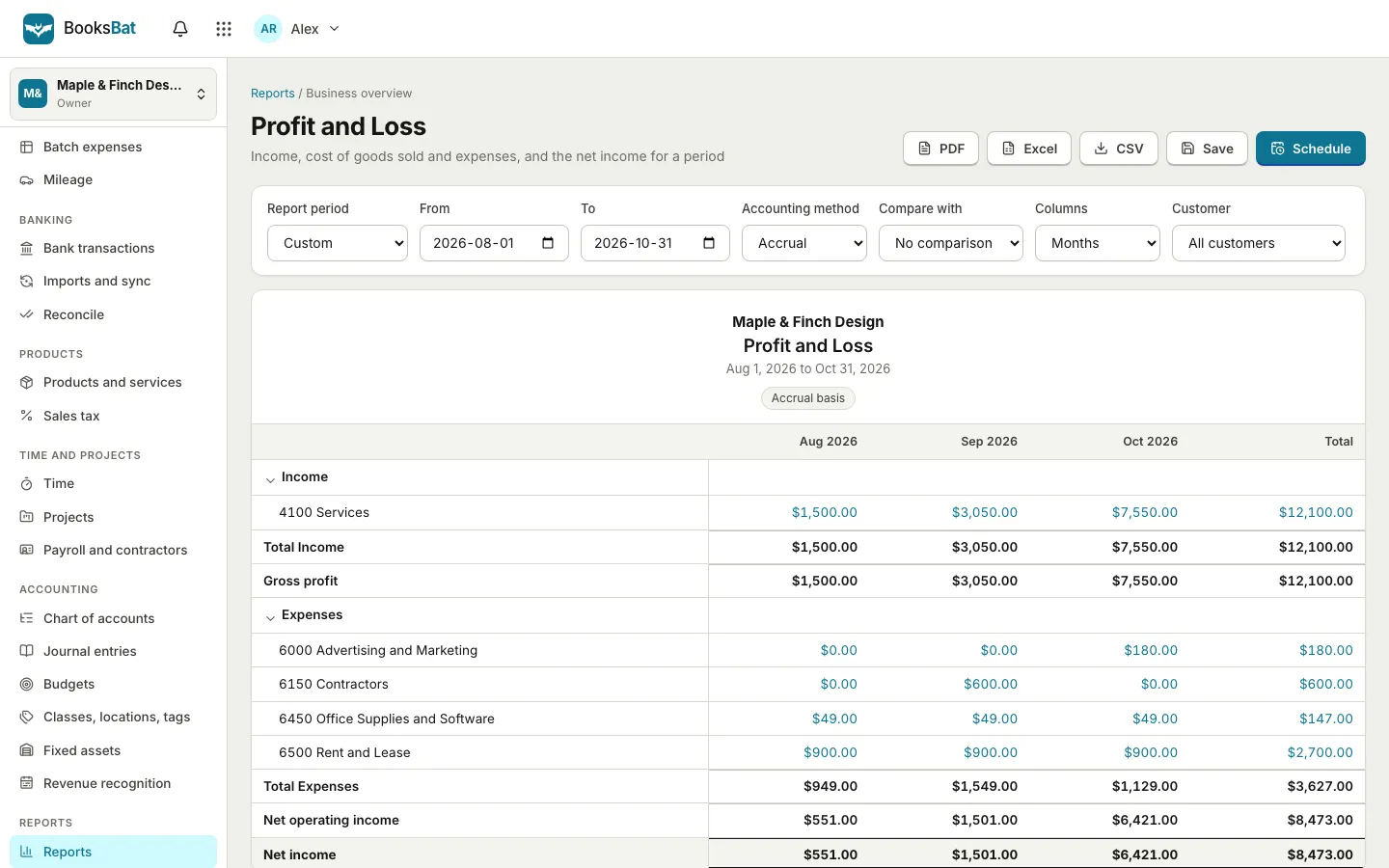
BooksBat builds its report in exactly this order, from the accounts in your chart of accounts.
Line by line
Income
Income is the money you earned from your main activity in the period: sales of products, fees for services, subscription revenue. In the example, the studio has one income account, Services, which collects every design invoice.
Watch the trend more than the number. Income that rises month after month is a good sign; a single big month is often one large project.
Cost of goods sold
Cost of goods sold, often shortened to COGS, is the direct cost of what you sold: materials, stock, packaging, and in some businesses the subcontractors who do the billable work. If you sell nothing physical, this section may be missing entirely, as it is for the sample studio, and gross profit simply equals income.
Gross profit
Gross profit = Income minus Cost of goods sold.
Gross profit tells you whether your prices cover the direct cost of delivering. Divided by income, it gives your gross margin. If your margin shrinks while sales grow, costs are rising faster than prices, and no amount of extra selling will fix it.
Expenses
Expenses, sometimes called operating expenses or overheads, are what it costs to run the business whether you sell a lot or a little: rent, software, advertising, insurance, contractors, meals with clients. Each account gets its own row, so you can see which ones are growing.
Net operating income
Net operating income = Gross profit minus Expenses.
This is the profit from the business itself. It is the clearest single number for "is the core business working?"
Other income and other expenses
Some money doesn't come from day to day trading: interest earned, a one off gain on selling equipment, interest paid on a loan. These sit below operating income so they don't distort the picture of the core business. BooksBat shows them with a Net other income line when there are any.
Net income
Net income = Net operating income plus Net other income.
The bottom line. Positive means a profit for the period, negative means a loss. In the example, the studio made a net income of $551.00 in August, $1,501.00 in September and $6,421.00 in October.
Cash or accrual: the same business, two answers
The Accounting method setting changes what counts in the period:
- Accrual: income counts when you invoice, and expenses when you receive the bill, whether or not money moved. This shows the work you did in the period.
- Cash: income and expenses count when they are paid. In BooksBat, "invoices and bills count when they are paid, in proportion to the amount paid", so a half paid invoice counts half.
Neither is wrong. Accrual is better for understanding performance; cash is closer to what happened in your bank account. Many small businesses look at both, and your accountant will tell you which one your tax return needs.
How to run the report in BooksBat
- Open Reports and choose Profit and Loss.
- Pick a Report period, or set From and To dates.
- Choose the Accounting method: Accrual or Cash.
- Set Columns to Total only, Months or Quarters.
- Optionally pick Compare with: Previous period or Previous year.
- Filter by Customer and other dimensions if you track them, such as class, location or project.
Every amount in blue is a link. Click it to see the transactions behind that number in the general ledger, which is the fastest way to answer "why is this so high?"
Comparing periods
A single P&L tells you what happened. Two side by side tell you what changed. With Compare with set to Previous period, BooksBat adds the earlier period plus Change and % change columns.
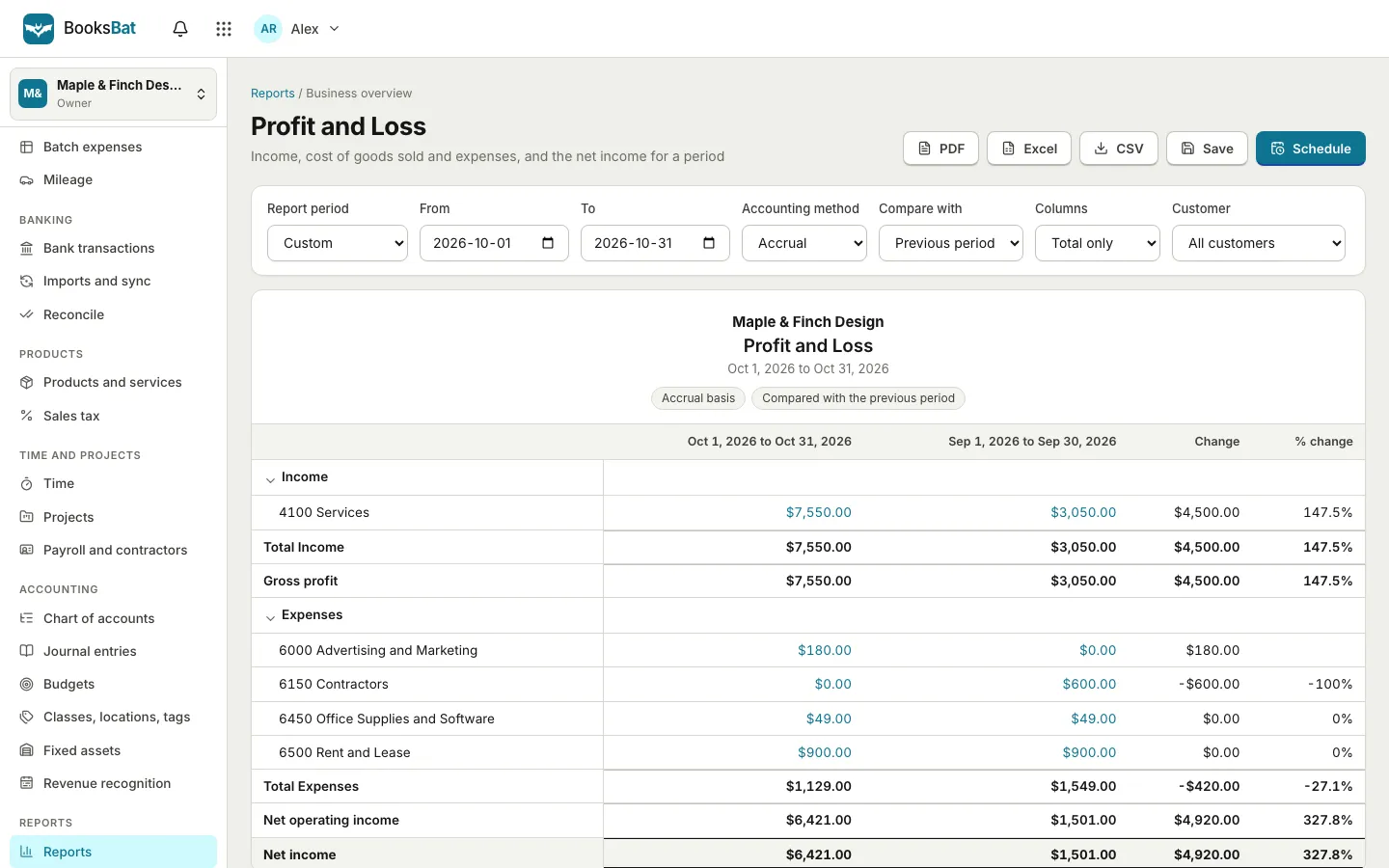
In the example, October income grew by $4,500.00 over September while total expenses fell by $420.00, because a one off contractor cost in September didn't repeat. That second detail matters: a jump in profit can come from lower costs as easily as from higher sales, and the comparison shows which.
Five questions to ask your P&L every month
- Is income growing, flat or falling? Look at three or more months, not one.
- Is gross margin holding? If you have cost of goods sold, check the percentage, not just the amount.
- Which expense grew the most? Click it and look at the transactions.
- Is anything missing? A month with no rent or no software bill usually means an unrecorded expense, not a cheap month.
- Does net income match your sense of the business? If the report says profit but the bank is empty, compare it with the cash flow statement. Profit and cash are not the same thing.
Keep the report trustworthy
A P&L is only as good as the bookkeeping under it:
- Record every invoice and expense. In BooksBat, invoices, payments, expenses and bills post to the ledger automatically, so the report fills itself as you work. Converting quotes into invoices and sending recurring invoices keeps income complete.
- Reconcile your bank account monthly. It catches missing and duplicate transactions. See bank reconciliation for small business.
- Categorise expenses consistently. The same kind of cost should always go to the same account. Our guide to tracking expenses as a freelancer has a simple system.
Sharing the report
Use PDF, Excel or CSV to export it, Save to keep your settings as a saved report, and Schedule to email it automatically, for example to your accountant every month. Export and scheduling are part of Pro. Even better, give your accountant their own access so they can run any report themselves.
Frequently asked questions
What is the difference between gross profit and net income?
Gross profit is income minus the direct cost of what you sold. Net income is what remains after you also subtract operating expenses and add or subtract other income and expenses. Gross profit shows whether your prices work; net income shows whether the whole business does.
Is a profit and loss statement the same as an income statement?
Yes. Profit and loss statement, P&L, income statement and statement of operations are different names for the same report.
Should I use cash or accrual for my P&L?
Accrual shows the work you did in a period because it counts invoices and bills when they are issued. Cash shows when money actually moved. Many owners look at both; ask your accountant which method your tax return uses.
How often should a small business review its P&L?
Monthly is a good rhythm. It is often enough to catch problems early and long enough for the numbers to mean something. Compare each month with the one before and with the same month last year.
Can I see the transactions behind a number in the report?
Yes. In BooksBat every amount in the report links to the general ledger, filtered to that account and period, so you can see each transaction that makes up the number.